
Planet Python
Last update: May 08, 2024 07:42 AM UTC
May 07, 2024
Glyph Lefkowitz
Hope
Humans are pattern-matching machines. As a species, it is our superpower. To summarize the core of my own epistemic philosophy, here is a brief list of the activities in the core main-loop of a human being:
- stuff happens to us
- we look for patterns in the stuff
- we weave those patterns into narratives
- we turn the narratives into models of the world
- we predict what will happen based on those models
- we do stuff based on those predictions
- based on the stuff we did, more stuff happens to us; return to step 1
While this ability lets humans do lots of great stuff, like math and physics and agriculture and so on, we can just as easily build bad stories and bad models. We can easily trick ourselves into thinking that our predictive abilities are more powerful than they are.
The existence of magic-seeming levels of prediction in fields like chemistry and physics and statistics, in addition to the practical usefulness of rough estimates and heuristics in daily life, itself easily creates a misleading pattern. “I see all these patterns and make all these predictions and I’m right a lot of the time, so if I just kind of wing it and predict some more stuff, I’ll also be right about that stuff.”
This leaves us very vulnerable to things like mean world syndrome. Mean world syndrome itself is specifically about danger, but I believe it is a manifestation of an even broader phenomenon which I would term “the apophenia of despair”.
Confirmation bias is an inherent part of human cognition, but the internet has turbocharged it. Humans have immediate access to more information than we ever had in the past. In order to cope with that information, we have also built ways to filter that information. Even disregarding things like algorithmic engagement maximization and social media filter bubbles, the simple fact that when you search for things, you are a lot more likely to find the thing that you’re searching for than to find arguments refuting it, can provide a very strong sense that you’re right about whatever you’re researching.
All of this is to say: if you decide that something in the world is getting worse, you can very easily convince yourself that it is getting much, much worse, very rapidly. Especially because there are things which are, unambiguously, getting worse.
However, Pollyanna-ism is just the same phenomenon in reverse and I don’t want to engage in that. The ice sheets really are melting, globally, fascism really is on the rise. I am not here to deny reality or to cherry pick a bunch of statistics to lull people into complacency.
I believe that while dwelling on a negative reality is bad, I also believe that in the face of constant denial, it is sometimes necessary to simply emphasize those realities, however unpleasant they may be. Distinguishing between unhelpful rumination on negativity and repetition of an unfortunate but important truth to correct popular perception is subjective and subtle, but the difference is nevertheless important.
As our ability to acquire information about things getting worse has grown, our ability to affect those things has not. Knowledge is not power; power is power, and most of us don’t have a lot of it, so we need to be strategic in the way that we deploy our limited political capital and personal energy.
Overexposure to negative news can cause symptoms of depression; depressed people have reduced executive function and find it harder to do stuff. One of the most effective interventions against this general feeling of malaise? Hope.. Not “hope” in the sense of wishing. As this article in the American Psychological Association’s “Monitor on Psychology” puts it:
“We often use the word ‘hope’ in place of wishing, like you hope it rains today or you hope someone’s well,” said Chan Hellman, PhD, a professor of psychology and founding director of the Hope Research Center at the University of Oklahoma. “But wishing is passive toward a goal, and hope is about taking action toward it.”
Here, finally, I can get around to my point.
If you have an audience, and you have some negative thoughts about some social trend, talking about it in a way which is vague and non-actionable is potentially quite harmful. If you are doing this, you are engaged in the political project of robbing a large number of people of hope. You are saying that the best should have less conviction, while the worst will surely remain just as full of passionate intensity.
I do not mean to say that it is unacceptable to ever publicly share thoughts of sadness, or even hopelessness. If everyone in public is forced to always put on a plastic smile and pretend that everything is going to be okay if we have grit and determination, then we have an Instagram culture of fake highlight reels where anyone having their own struggles with hopelessness will just feel even worse in their isolation. I certainly posted my way through my fair share of pretty bleak mental health issues during the worst of the pandemic.
But we should recognize that while sadness is a feeling, hopelessness is a problem, a bad reaction to that feeling, one that needs to be addressed if we are going to collectively dig ourselves out of the problem that creates the sadness in the first place. We may not be able to conjure hope all the time, but we should always be trying.
When we try to address these feelings, as I said earlier, Pollyanna-ism doesn’t help. The antidote to hopelessness is not optimism, but curiosity. If you have a strong thought like “people these days just don’t care about other people1”, yelling “YES THEY DO” at yourself (or worse, your audience) is unlikely to make much of a change, and certainly not likely to be convincing to an audience. Instead, you could ask yourself some questions, and use them for a jumping-off point for some research:
- Why do I think this — is the problem in my perception, or in the world?
- If there is a problem in my perception, is this a common misperception? If it’s common, what is leading to it being common? If it’s unique to me, what sort of work do I need to do to correct it?
- If the problem is real, what are its causes? Is there anything that I, or my audience, could do to address those causes?
The answers to these questions also inform step 6 of the process I outlined above: the doing stuff part of the process.
At some level, all communication is persuasive communication. Everything you say that another person might hear, everything you say that a person might hear, is part of a sprachspiel where you are attempting to achieve something. There is always an implied call to action; even “do nothing, accept the status quo” is itself an action. My call to action right now is to ask you to never make your call to action “you should feel bad, and you should feel bad about feeling bad”. When you communicate in public, your words have power.
Use that power for good.
Acknowledgments
Thank you to my patrons who are supporting my writing on this blog. If you like what you’ve read here and you’d like to read more of it, or you’d like to support my various open-source endeavors, you can support my work as a sponsor! Special thanks also to Cassandra Granade, who provided some editorial feedback on this post; any errors, of course, remain my own.
-
I should also note that vague sentiments of this form, “things used to be better, now they’re getting worse”, are at their core a reactionary yearning for a prelapsarian past, which is both not a good look and also often wrong in a very common way. Complaining about how “people” are getting worse is a very short journey away from complaining about kids these days, which has a long and embarrassing history of being comprehensively incorrect in every era. ↩
Python Engineering at Microsoft
Announcing Data Wrangler: Code-centric viewing and cleaning of tabular data in Visual Studio Code
Today, we are excited to announce the general availability of the Data Wrangler extension for Visual Studio Code! Data Wrangler is a free extension that offers data viewing and cleaning that is directly integrated into VS Code and the Jupyter extension. It provides a rich user interface to view and analyze your data, show insightful column statistics and visualizations, and automatically generate Pandas code as you clean and transform the data. We want to thank all the early adopters who tried out the extension preview over the past year, as your valuable feedback has been crucial to this release.
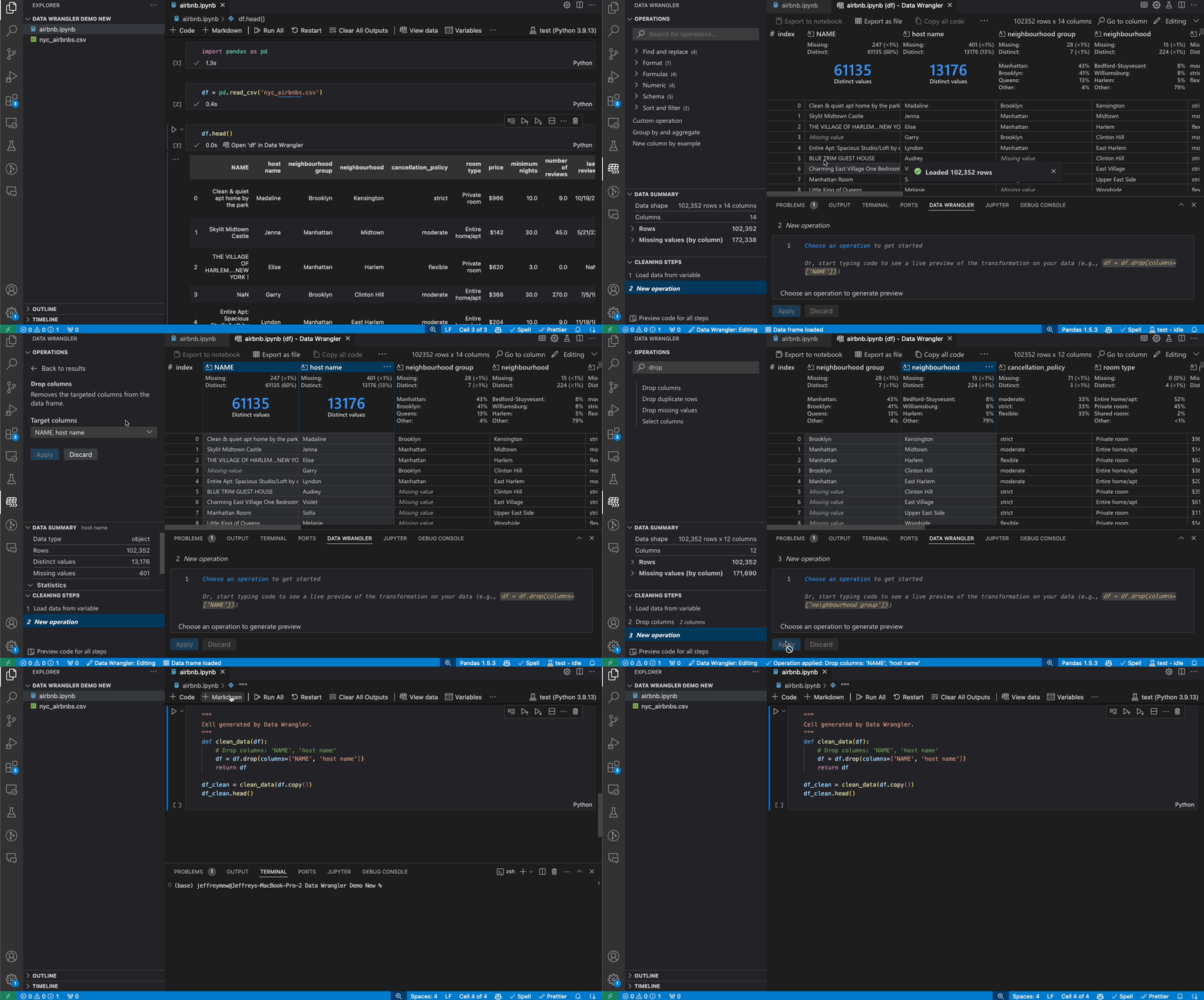
With this general availability, we are also announcing that the data viewer feature in the Jupyter extension will be going away. In its place, you will be able to use the new and improved data viewing experience offered by Data Wrangler, which is also built by Microsoft. We understand that the data viewer was a beloved feature from our customers, and we see this as the next evolution to working with data in VS Code in an extensible manner and hope that you will love the Data Wrangler extension even more than the data viewer feature. Several of the improvements and features of Data Wrangler are highlighted below.
Previewing data
Once the Data Wrangler extension is installed, you can get to Data Wrangler in one of three ways from the Jupyter Notebook.

- In the Jupyter > Variables panel, beside any supported data object, you can see a button to open it in Data Wrangler.
- If you have a supported data object in your notebook (such as a Pandas DataFrame), you can now see an Open ‘df’ in Data Wrangler button (where ‘df’ is the variable name of your data frame) appear in bottom of the cell after running code that outputs the data frame. This includes df.head(), df.tail(), display(df), print(df), df.
- In the notebook toolbar, selecting View data brings up a list of every supported data object in your notebook. You can then choose which variable in that list you want to open in Data Wrangler.
Alternatively, Data Wrangler can also be directly opened from a local file (such as CSV, Excel, or parquet files) by right clicking the file and selecting “Open in Data Wrangler”.
Filtering and sorting
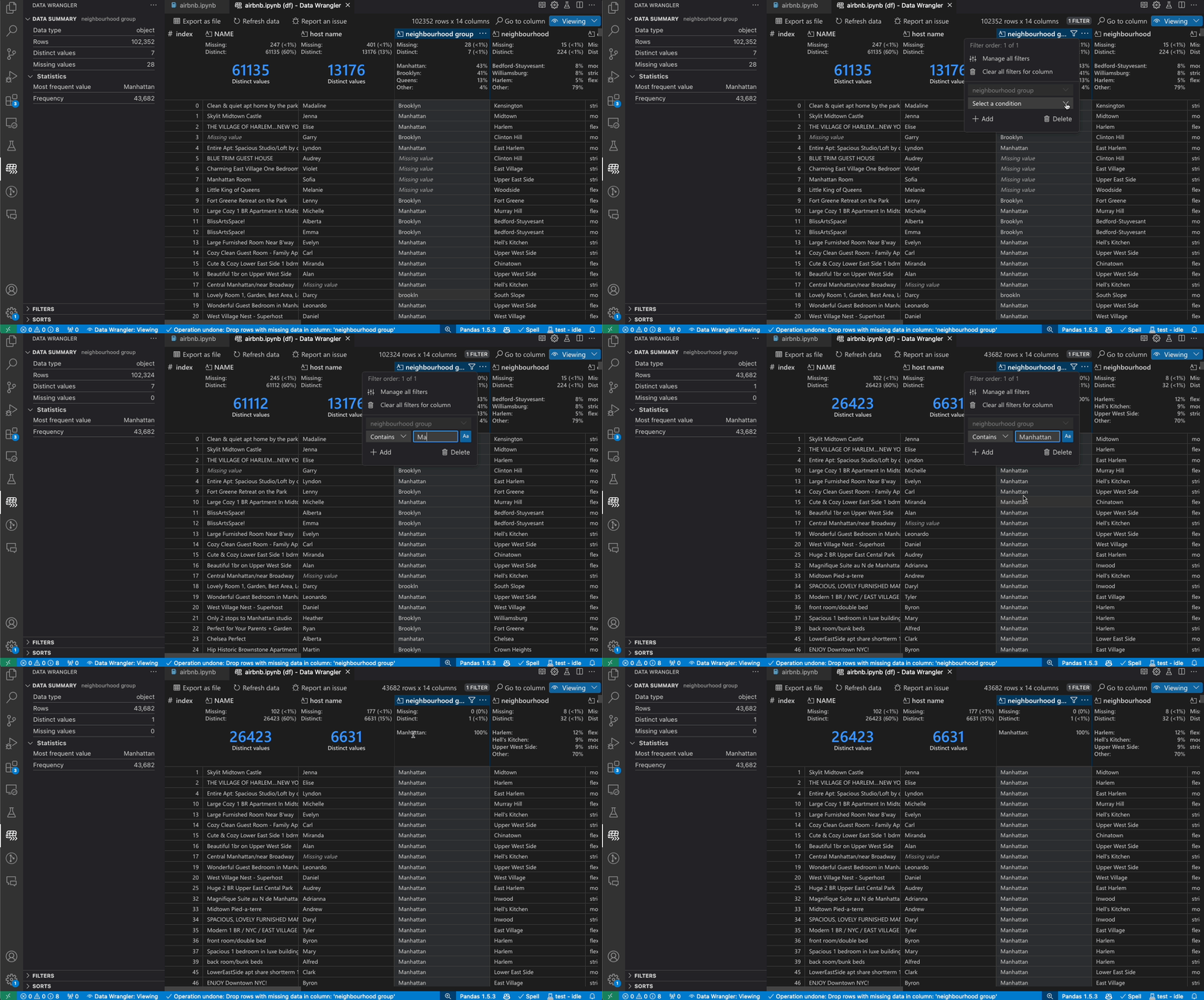
Data Wrangler can be used to quickly filter and sort through your rows of data.
Transforming data
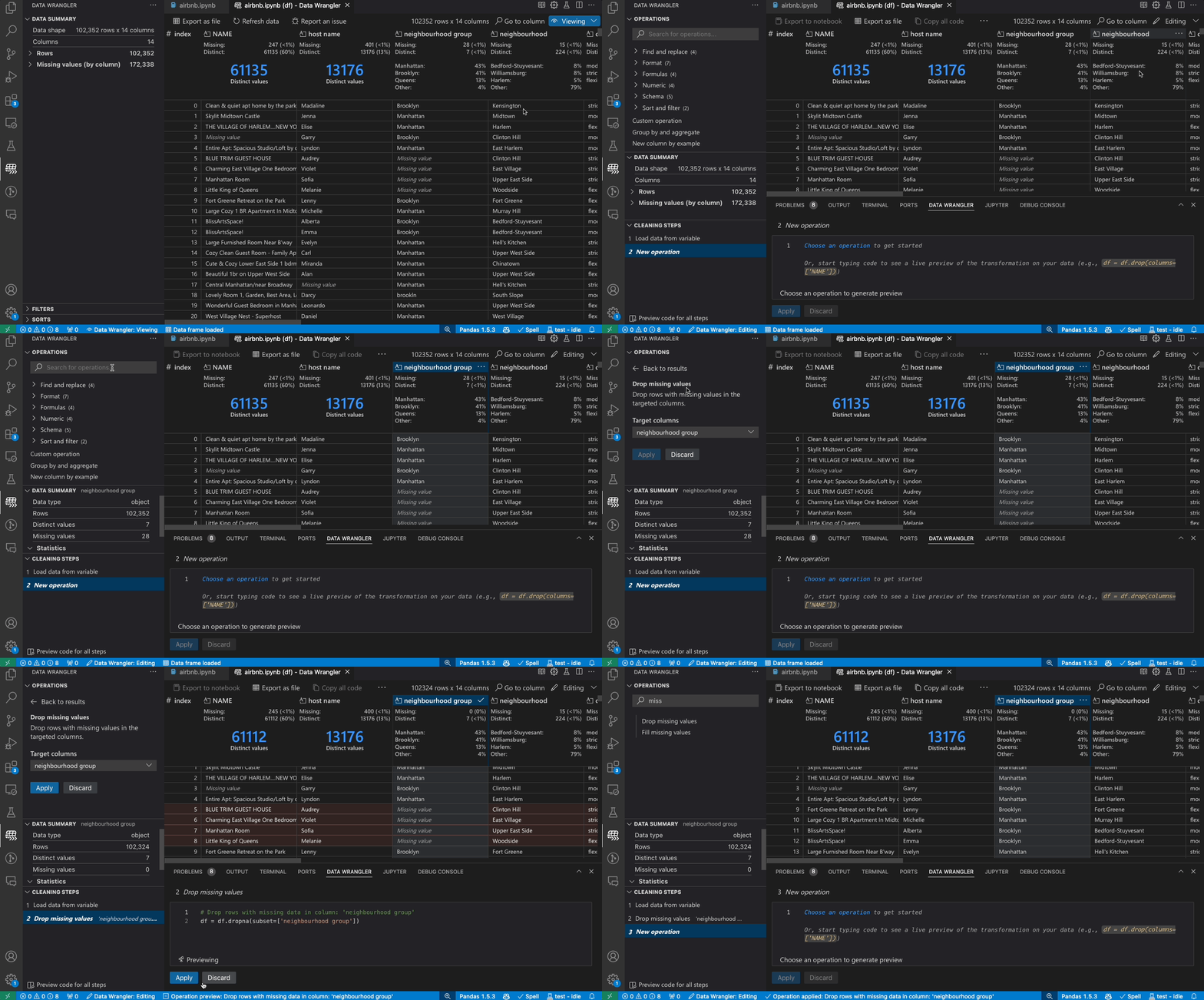
Switch from Viewing to Editing mode to unlock additional functionality and built-in data cleaning operations in Data Wrangler. For a full list of supported operations, see the documentation here.
Code generation
As you make changes to the data using the built-in operations, Data Wrangler automatically generates code using open-source Python libraries for the data transformation operations you perform.
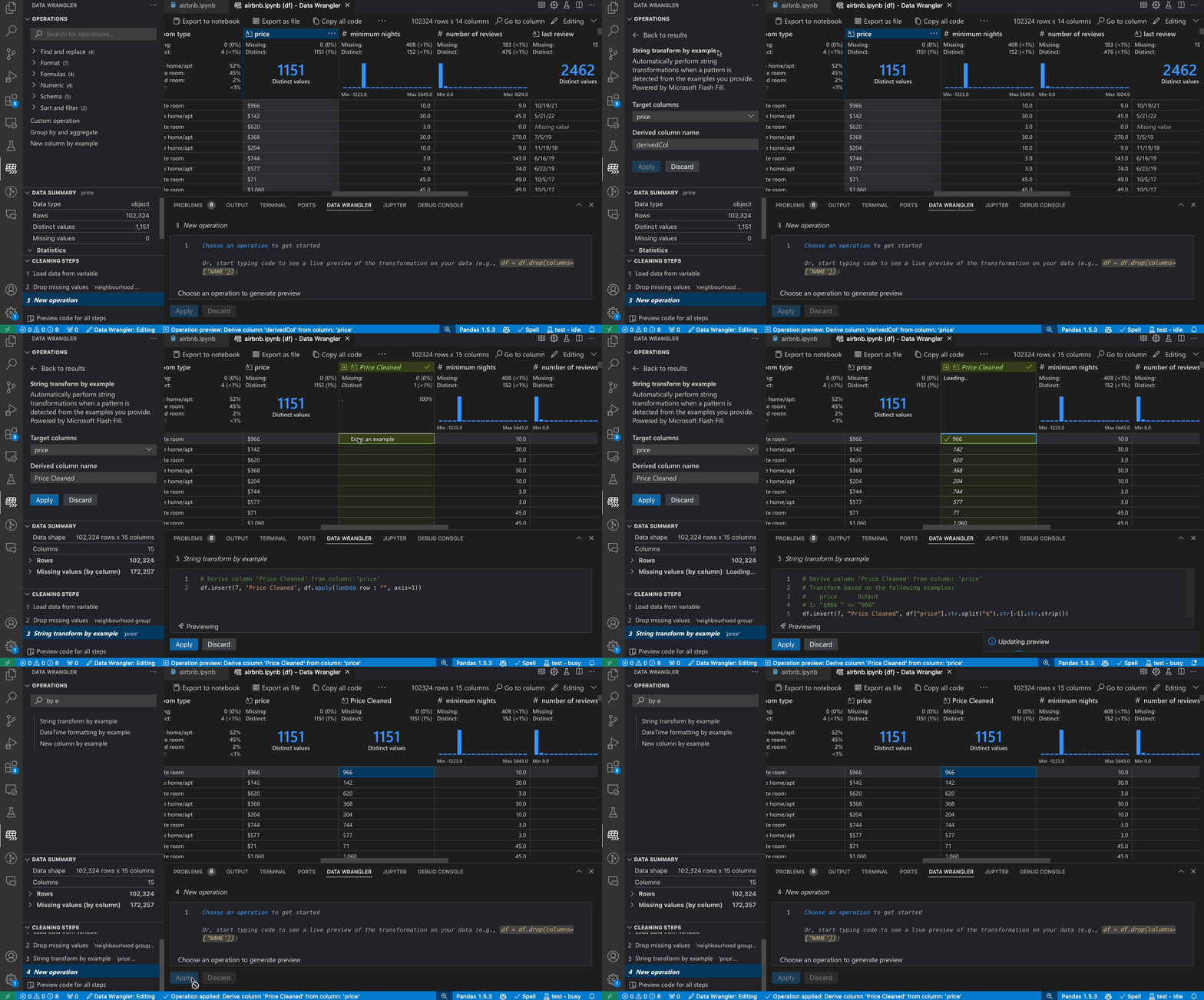
When you are done wrangling your data, all the automatically generated code from your data cleaning session can then be exported either back into your Notebook, or into a new Python file.
Trying Data Wrangler today
To start using Data Wrangler today in Visual Studio Code, just download the Data Wrangler extension from the VS Code marketplace to try it out! You can then launch Data Wrangler from any supported data object in a Jupyter Notebook or direct from a data file.

This article only covered some of the high-level features of what Data Wrangler can do. To learn more about Data Wrangler in detail, please check out the Data Wrangler documentation.
The post Announcing Data Wrangler: Code-centric viewing and cleaning of tabular data in Visual Studio Code appeared first on Python.
PyCoder’s Weekly
Issue #628 (May 7, 2024)
#628 – MAY 7, 2024
View in Browser »

TypeIs Does What I Thought TypeGuard Would Do in Python
In this post, Redowan discusses the fact that TypeGuard has always confused him, and that the newer TypeIs feature does what he thought TypeGuard should do. Read on to learn about them both.
REDOWAN DELOWAR
Python’s unittest: Writing Unit Tests for Your Code
In this tutorial, you’ll learn how to use the unittest framework to create unit tests for your Python code. Along the way, you’ll also learn how to create test cases, fixtures, test suites, and more.
REAL PYTHON
Webinar - Make Open Source Suck Less

Tired of dependency conflicts, corrupted environments and “works on my machine” issues? Learn the shortfalls of standard package and environment tools (i.e. pip and venv), and how you can achieve reproducibility, dependency management and security at scale - Watch the Webinar On-Demand →
ACTIVESTATE sponsor
Avoid Conflicts and Let Your OS Select a Python Web App Port
Hard-coded port numbers can be problematic during development because they prevent you from running multiple instances of the same server process in parallel. This article explains how to work around this issue by letting your operating system automatically select a random port number.
CHRISTOPH SCHIESSL • Shared by Christoph Schiessl
Quiz: The Python Calendar Module
In this quiz, you’ll test your understanding of the calendar module in Python. It’ll evaluate your proficiency in manipulating, customizing, and displaying calendars directly within your terminal. By working through this quiz, you’ll revisit the fundamental functions and methods provided by the calendar module.
REAL PYTHON
Quiz: What Is the __pycache__ Folder in Python?
In this quiz, you’ll have the opportunity to test your knowledge of the __pycache__ folder, including when, where, and why Python creates these folders.
REAL PYTHON
Discussions
Everything Google’s Python Team Were Responsible For
Google recently laid off the majority of their internal Python team. This post to HN, from one of the former team members, covers just what that team was responsible for. The ensuing discussion also includes comments from others on that team as well.
HACKER NEWS
Python Jobs
Senior Python Engineer: Generative AI, Social Media x Web3 (Anywhere)
Articles & Tutorials
Working With Global Variables in Python Functions
In this video course, you’ll learn how to use global variables in Python functions using the global keyword or the built-in globals() function. You’ll also learn a few strategies to avoid relying on global variables because they can lead to code that’s difficult to understand, debug, and maintain.
REAL PYTHON course
Embarking on a Relaxed and Friendly Python Coding Journey
Do you get stressed while trying to learn Python? Do you prefer to build small programs or projects as you continue your coding journey? This week on the show, Real Python author Stephen Gruppetta is here to talk about his new book, “The Python Coding Book.”
REAL PYTHON podcast
How to Watermark a Graph With Matplotlib
“Matplotlib is one of the most popular data visualization packages for the Python programming language. It allows you to create many different charts and graphs.” With it you can even put a watermark on your charts, this tutorial shows you how.
MIKE DRISCOLL
Software Friction
Friction is everywhere in software development. Two setbacks are more than twice as bad as one setback. This article discusses the sources of software friction and what you can do about it.
HILLEL WAYNE
The Magician’s Sleight of Hand
Even functions in Python are objects and can be re-assigned and manipulated. This article shows a problem that at first looks impossible, but can be handled with a few key re-assigments.
STEPHEN GRUPPETTA • Shared by Stephen Gruppetta
4 Software Design Principles I Learned the Hard Way
Leonardo talks about four principles of software engineering he’s learned though his career. Some are against common practice: DRY may not be you friend.
LEONARDO CREED
Isolating Risk in the CPython Release Process
This is a quick summary of the changes to the CPython build process to help reduce the risks caused by extra dependencies.
SETH LARSON
Building Reusable Components in Django
This tutorial looks at how to build server-side, reusable UI components in Django using the django-viewcomponent library.
MICHAEL YIN • Shared by Michael Herman
Projects & Code
Events
Python Atlanta
May 9 to May 10, 2024
MEETUP.COM
DFW Pythoneers 2nd Saturday Teaching Meeting
May 11, 2024
MEETUP.COM
PiterPy Meetup
May 14, 2024
PITERPY.COM
Leipzig Python User Group Meeting
May 14, 2024
MEETUP.COM
IndyPy Monthly Meetup
May 14 to May 15, 2024
MEETUP.COM
PyCon US 2024
May 15 to May 24, 2024
PYCON.ORG
Flask Con 2024
May 17 to May 18, 2024
FLASKCON.COM
Happy Pythoning!
This was PyCoder’s Weekly Issue #628.
View in Browser »
[ Subscribe to 🐍 PyCoder’s Weekly 💌 – Get the best Python news, articles, and tutorials delivered to your inbox once a week >> Click here to learn more ]
Python Software Foundation
PSF Board Election Dates for 2024
PSF Board elections are a chance for the community to choose representatives to help the PSF create a vision for and build the future of the Python community. This year there are 3 seats open on the PSF board. Check out who is currently on the PSF Board. (Débora Azevedo, Kwon-Han Bae, and Tania Allard are at the end of their current terms.)
Board Election Timeline
- Nominations open: Tuesday, June 11th, 2:00 pm UTC
- Nomination cut-off: Tuesday, June 25th, 2:00 pm UTC
- Voter application/affirmation cut-off date: Tuesday, June 25th, 2:00 pm UTC
- Announce candidates: Thursday, June 27th
- Voting start date: Tuesday, July 2nd, 2:00 pm UTC
- Voting end date: Tuesday, July 16th, 2:00 pm UTC
Voting
You must be a contributing, managing, supporting, or fellow member by June 25th to vote in this election. Check out the PSF membership page to learn more about membership classes and benefits. If you have questions about membership or nominations please email psf-elections@pyfound.org
Run for the Board
Who runs for the board? People who care about the Python community, who want to see it flourish and grow, and also have a few hours a month to attend regular meetings, serve on committees, participate in conversations, and promote the Python community. Check out our Life as Python Software Foundation Director video to learn more about what being a part of the PSF Board entails. We also invite you to review our Annual Impact Report for 2023 to learn more about the PSF mission and what we do.
You can nominate yourself or someone else. We would encourage you to reach out to folks before you nominate them to make sure they are enthusiastic about the potential of joining the Board. Nominations open on Tuesday, June 11th, 2:00 pm UTC, so you have a few weeks to research the role and craft a nomination statement.
Learn more and join the discussion
You are welcome to join the discussion about the PSF Board election on our forum. This year we’ll also be running Office Hours on the PSF Discord to answer questions about running for the board and serving on the board. Details for the Office Hours will be announced soon! Subscribe to the PSF blog or join psf-member-announce to receive updates leading up to the election.
Django Weblog
Django bugfix releases issued: 5.0.6 and 4.2.13
Today we've issued 5.0.6 and 4.2.13 as reissues of the 5.0.5 and 4.2.12 bugfix releases.
The release package and checksums are available from our downloads page, as well as from the Python Package Index. The PGP key ID used for this release is Natalia Bidart: 2EE82A8D9470983E.
Real Python
Flattening a List of Lists in Python
Sometimes, when you’re working with data, you may have the data as a list of nested lists. A common operation is to flatten this data into a one-dimensional list in Python. Flattening a list involves converting a multidimensional list, such as a matrix, into a one-dimensional list.
In this video course, you’ll learn how to do that in Python.
[ Improve Your Python With 🐍 Python Tricks 💌 – Get a short & sweet Python Trick delivered to your inbox every couple of days. >> Click here to learn more and see examples ]
Shannon -jj Behrens
Python: My Favorite Python Tricks for LeetCode Questions
I've been spending a lot of time practicing on LeetCode recently, so I thought I'd share some of my favorite intermediate-level Python tricks. I'll also cover some newer features of Python you may not have started using yet. I'll start with basic tips and then move to more advanced ones.
Get help()
Python's documentation is pretty great, and some of these examples are taken from there.
For instance, if you just google "heapq", you'll see the official docs for heapq, which are often enough.
However, it's also helpful to sometimes just quickly use help() in the shell. Here, I can't remember that push() is actually called append().
>>> help([])

>>> dir([])

>>> help([].append)
enumerate()
If you need to loop over a list, you can use enumerate() to get both the item as well as the index. As a mnemonic, I like to think for (i, x) in enumerate(...):
for (i, x) in enumerate(some_list):
    ...
items()
Similarly, you can get both the key and the value at the same time when looping over a dict using items():
for (k, v) in some_dict.items():
    ...
[] vs. get()
Remember, when you use [] with a dict, if the value doesn't exist, you'll get a KeyError. Rather than see if an item is in the dict and then look up its value, you can use get():
val = some_dict.get(key)  # It defaults to None.
if val is None:
    ...
Similarly, .setdefault() is sometimes helpful.
Some people prefer to just use [] and handle the KeyError since exceptions aren't as expensive in Python as they are in other languages.
range() is smarter than you think
for item in range(items):
    ...

for index in range(len(items)):
    ...

# Count by 2s.
for i in range(0, 100, 2):
    ...

# Count backward from 100 to 0 inclusive.
for i in range(100, -1, -1):
    ...

# Okay, Mr. Smarty Pants, I'm sure you knew all that, but did you know
# that you can pass a range object around, and it knows how to reverse
# itself via slice notation? :-P
r = range(100)
r = r[::-1]  # range(99, -1, -1)
print(f'') debugging
Have you switched to Python's new format strings yet? They're more convenient and safer (from injection vulnerabilities) than % and .format(). They even have a syntax for outputing the thing as well as its value:
# Got 2+2=4
print(f'Got {2+2=}')
for else
Python has a feature that I haven't seen in other programming languages. Both for and while can be followed by an else clause, which is useful when you're searching for something.
for item in some_list:
    if is_what_im_looking_for(item):
        print(f"Yay! It's {item}.")
        break
else:
    print("I couldn't find what I was looking for.")
Use a list as a stack
The cost of using a list as a stack is (amortized) O(1):
elements = []
elements.append(element)  # Not push
element = elements.pop()
Note that inserting something at the beginning of the list or in the middle is more expensive it has to shift everything to the right--see deque below.
sort() vs. sorted()
# sort() sorts a list in place.
my_list.sort()

# Whereas sorted() returns a sorted *copy* of an iterable:
my_sorted_list = sorted(some_iterable)
And, both of these can take a key function if you need to sort objects.
set and frozenset
Sets are so useful for so many problems! Just in case you didn't know some of these tricks:
# There is now syntax for creating sets.
s = {'Von'}

# There are set "comprehensions" which are like list comprehensions, but for sets.
s2 = {f'{name} the III' for name in s}
{'Von the III'}

# If you can't remember how to use union, intersection, difference, etc.
help(set())

# If you need an immutable set, for instance, to use as a dict key, use frozenset.
frozenset((1, 2, 3))
deque
If you find yourself needing a queue or a list that you can push and pop from either side, use a deque:
>>> from collections import deque
>>>
>>> d = deque()
>>> d.append(3)
>>> d.append(4)
>>> d.appendleft(2)
>>> d.appendleft(1)
>>> d
deque([1, 2, 3, 4])
>>> d.popleft()
1
>>> d.pop()
4
Using a stack instead of recursion
Instead of using recursion (which has a depth of about 1024 frames), you can use a while loop and manually manage a stack yourself. Here's a slightly contrived example:
work = [create_initial_work()]
while work:
    work_item = work.pop()
    result = process(work_item)
    if is_done(result):
        return result
    work.append(result.pieces[0])
    work.append(result.pieces[1])
Using yield from
If you don't know about yield, you can go spend some time learning about that. It's awesome.
Sometimes, when you're in one generator, you need to call another generator. Python now has yield from for that:
def my_generator():
    yield 1
    yield from some_other_generator()
    yield 6
So, here's an example of backtracking:
class Solution:
    def problem(self, digits: str) -> List[str]:
        def generate_possibilities(work_so_far, remaining_work):
            if not remaining_work:
                if work_so_far:
                    yield work_so_far
                return
            first_part, remaining_part = remaining_work[0], remaining_work[1:]
            for i in things_to_try:
                yield from generate_possibilities(work_so_far + i, remaining_part)

        output = list(generate_possibilities(no_work_so_far, its_all_remaining_work))
        return output
This is appropriate if you have less than 1000 "levels" but a ton of possibilities for each of those levels. This won't work if you're going to need more than 1000 layers of recursion. In that case, switch to "Using a stack instead of recursion".
Updated: On the other hand, if you can have the recursive function append to some list of answers instead of yielding it all the way back to the caller, that's faster.
Pre-initialize your list
If you know how long your list is going to be ahead of time, you can avoid needing to resize it multiple times by just pre-initializing it:
dp = [None] * len(items)
collections.Counter()
How many times have you used a dict to count up something? It's built-in in Python:
>>> from collections import Counter
>>> c = Counter('abcabcabcaaa')
>>> c
Counter({'a': 6, 'b': 3, 'c': 3})
defaultdict
Similarly, there's defaultdict:
>>> from collections import defaultdict
>>> d = defaultdict(list)
>>> d['girls'].append('Jocylenn')
>>> d['boys'].append('Greggory')
>>> d
defaultdict(<class 'list'>, {'girls': ['Jocylenn'], 'boys': ['Greggory']})
Notice that I didn't need to set d['girls'] to an empty list before I started appending to it.
heapq
I had heard of heaps in school, but I didn't really know what they were. Well, it turns out they're pretty helpful for several of the problems, and Python has a list-based heap implementation built-in.
If you don't know what a heap is, I recommend this video and this video. They'll explain what a heap is and how to implement one using a list.
The heapq module is a built-in module for managing a heap. It builds on top of an existing list:
import heapq

some_list = ...
heapq.heapify(some_list)

# The head of the heap is some_list[0].
# The len of the heap is still len(some_list).

heapq.heappush(some_list, item)
head_item = heapq.heappop(some_list)
The heapq module also has nlargest and nsmallest built-in so you don't have to implement those things yourself.
Keep in mind that heapq is a minheap. Let's say that what you really want is a maxheap, and you're not working with ints, you're working with objects. Here's how to tweak your data to get it to fit heapq's way of thinking:
heap = []
heapq.heappush(heap, (-obj.value, obj))

(ignored, first_obj) = heapq.heappop()
Here, I'm using - to make it a maxheap. I'm wrapping things in a tuple so that it's sorted by the obj.value, and I'm including the obj as the second value so that I can get it.
Use bisect for binary search
I'm sure you've implemented binary search before. Python has it built-in. It even has keyword arguments that you can use to search in only part of the list:
import bisect

insertion_point = bisect.bisect_left(sorted_list, some_item, lo=lo, high=high)
Pay attention to the key argument which is sometimes useful, but may take a little work for it to work the way you want.
namedtuple and dataclasses
Tuples are great, but it can be a pain to deal with remembering the order of the elements or unpacking just a single element in the tuple. That's where namedtuple comes in.
>>> from collections import namedtuple
>>> Point = namedtuple('Point', ['x', 'y'])
>>> p = Point(5, 7)
>>> p
Point(x=5, y=7)
>>> p.x
5
>>> q = p._replace(x=92)
>>> p
Point(x=5, y=7)
>>> q
Point(x=92, y=7)
Keep in mind that tuples are immutable. I particularly like using namedtuples for backtracking problems. In that case, the immutability is actually a huge asset. I use a namedtuple to represent the state of the problem at each step. I have this much stuff done, this much stuff left to do, this is where I am, etc. At each step, you take the old namedtuple and create a new one in an immutable way.
Updated: Python 3.7 introduced dataclasses. These have multiple advantages:
- They can be mutable or immutable (although, there's a small performance penalty).
- You can use type annotations.
- You can add methods.
from dataclasses import dataclass

@dataclass  # Or: @dataclass(frozen=True)
class InventoryItem:
    """Class for keeping track of an item in inventory."""
    name: str
    unit_price: float
    quantity_on_hand: int = 0

    def total_cost(self) -> float:
        return self.unit_price * self.quantity_on_hand

item = InventoryItem(name='Box', unit_price=19, quantity_on_hand=2)
dataclasses are great when you want a little class to hold some data, but you don't want to waste much time writing one from scratch.
Updated: Here's a comparison between namedtuples and dataclasses. It leads me to favor dataclasses since they have faster property access and use 30% less memory :-/ Per the Python docs, using frozen=True is slightly slower than not using it. In my (extremely unscientific) testing, using a normal class with __slots__ is faster and uses less memory than a dataclass.
int, decimal, math.inf, etc.
Thankfully, Python's int type supports arbitrarily large values by default:
>>> 1 << 128
340282366920938463463374607431768211456
There's also the decimal module if you need to work with things like money where a float isn't accurate enough or when you need a lot of decimal places of precision.
Sometimes, they'll say the range is -2 ^ 32 to 2 ^ 32 - 1. You can get those values via bitshifting:
>>> -(2 ** 32) == -(1 << 32)
True
>>> (2 ** 32) - 1 == (1 << 32) - 1
True
Sometimes, it's useful to initialize a variable with math.inf (i.e. infinity) and then try to find new values less than that.
Updated: If you want to save memory by not importing the math module, just use float("inf").
Closures
I'm not sure every interviewer is going to like this, but I tend to skip the OOP stuff and use a bunch of local helper functions so that I can access things via closure:
class Solution():  # This is what LeetCode gave me.
    def solveProblem(self, arg1, arg2):  # Why they used camelCase, I have no idea.

        def helper_function():
            # I have access to arg1 and arg2 via closure.
            # I don't have to store them on self or pass them around
            # explicitly.
            return arg1 + arg2

        counter = 0

        def can_mutate_counter():
            # By using nonlocal, I can even mutate counter.
            # I rarely use this approach in practice. I usually pass in it
            # as an argument and return a value.
            nonlocal counter
            counter += 1

       can_mutate_counter()
       return helper_function() + counter
match statement
Did you know Python now has a match statement?
# Taken from: https://learnpython.com/blog/python-match-case-statement/

>>> command = 'Hello, World!'
>>> match command:
...     case 'Hello, World!':
...         print('Hello to you too!')
...     case 'Goodbye, World!':
...         print('See you later')
...     case other:
...         print('No match found')
It's actually much more sophisticated than a switch statement, so take a look, especially if you've never used match in a functional language like Haskell.
OrderedDict
If you ever need to implement an LRU cache, it'll be quite helpful to have an OrderedDict.
Python's dicts are now ordered by default. However, the docs for OrderedDict say that there are still some cases where you might need to use OrderedDict. I can't remember. If you never need your dicts to be ordered, just read the docs and figure out if you need an OrderedDict or if you can use just a normal dict.
@functools.cache
If you need a cache, sometimes you can just wrap your code in a function and use functools.cache:
from functools import cache

@cache
def factorial(n):
    return n * factorial(n - 1) if n else 1

print(factorial(5))
...
factorial.cache_info()  # CacheInfo(hits=3, misses=8, maxsize=32, currsize=8)
Debugging ListNodes
A lot of the problems involve a ListNode class that's provided by LeetCode. It's not very "debuggable". Add this code temporarily to improve that:
def list_node_str(head):
    seen_before = set()
    pieces = []
    p = head
    while p is not None:
        if p in seen_before:
            pieces.append(f'loop at {p.val}')
            break
        pieces.append(str(p.val))
        seen_before.add(p)
        p = p.next
    joined_pieces = ', '.join(pieces)
    return f'[{joined_pieces}]'


ListNode.__str__ = list_node_str
Saving memory with the array module
Sometimes you need a really long list of simple numeric (or boolean) values. The array module can help with this, and it's an easy way to decrease your memory usage after you've already gotten your algorithm working.
>>> import array
>>> array_of_bytes = array.array('b')
>>> array_of_bytes.frombytes(b'\0' * (array_of_bytes.itemsize * 10_000_000))
Pay close attention to the type of values you configure the array to accept. Read the docs.
I'm sure there's a way to use individual bits for an array of booleans to save even more space, but it'd probably cost more CPU, and I generally care about CPU more than memory.
Using an exception for the success case rather than the error case
A lot of Python programmers don't like this trick because it's equivalent to goto, but I still occasionally find it convenient:
class Eureka(StopIteration):
    """Eureka means "I found it!" """
    pass


def do_something_else():
    some_value = 5
    raise Eureka(some_value)


def do_something():
    do_something_else()


try:
    do_something()
except Eureka as exc:
    print(f'I found it: {exc.args[0]}')
Updated: Enums
from enum import Enum

# Either:
class Color(Enum):
    RED = 1
    GREEN = 2
    BLUE = 3

# Or:
Color = Enum('Color', ['RED', 'GREEN', 'BLUE'])
RED = "RED"
GREEN = "GREEN"
BLUE = "BLUE"
Updated: Using a profiler
import cProfile
cProfile.run("Solution().someMethod(sampleData)")
Using VS Code, etc.
VS Code has a pretty nice Python extension. If you highlight the code and hit shift-enter, it'll run it in a shell. That's more convenient than just typing everything directly in the shell. Other editors have something similar, or perhaps you use a Jupyter notebook for this.
Another thing that helps me is that I'll often have separate files open with separate attempts at a solution. I guess you can call this the "fast" approach to branching.
Write English before Python
One thing that helps me a lot is to write English before writing Python. Just write all your thoughts. Keep adding to your list of thoughts. Sometimes you have to start over with a new list of thoughts. Get all the thoughts out, and then pick which thoughts you want to start coding first.
Conclusion
Well, those are my favorite tricks off the top of my head. I'll add more if I think of any.
This is just a single blog post, but if you want more, check out Python 3 Module of the Week.
Marcos Dione
Collating, processing, managing, backing up and serving a gallery of a 350GiB, 60k picture collection
In the last two days I have commented a little bit how I process and manage my photos. I'm not a very avid photographer, I have like 350 gigabytes of photos, most of them are yet not processed, around 60,000 of them. So I will comment a little bit more how do I manage all that.
I start with the camera, a 24Mpx camera, just a couple of lenses, nothing fancy. Go out, take some pictures, come back home.
I put the SD camera on my computer and I use my own software to import it.
The import process is not fancy, it just empties the SD card, checks every file for the
EXIF information, uses the date and time to create the filename, a sequence number if needed,
and puts them all in a single
incoming directory where all the current unprocessed images are1.
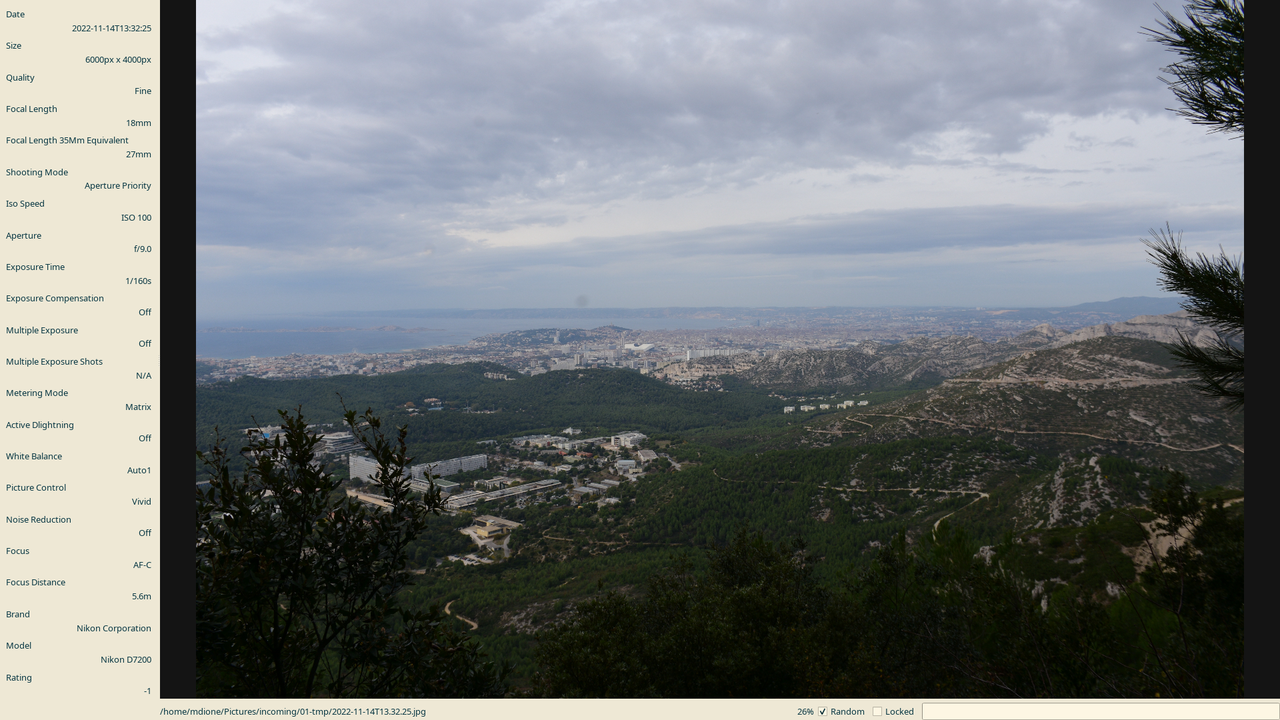
Then I use this software I developed in PyQt5.
It's very, very basic, but it's really quick, it's mostly keyboard based. It reads
the EXIF information and present some of the tags at the left of the screen; things like date,
time, size, orientation and then focal length, aperture, ISO and various other data I can
get from the images. It's mostly focused on my current camera and the previous one, both Nikons2.
The previous one was an N90, right now it's an N7200.
The image occupies most of the window, and the program is always in full screen.
At the bottom there's the filename and a couple of toggles.
I can do several things with this:
-
Go forwards, backwards, by one, by ten, by a hundred and by a thousand, because that
incomingdirectory right now has almost seven years of history, probably ten thousand pictures. -
Move randomly, which allows me to pick up a new thing to collate when I get bored with the current one but I want to keep doing it to reduce the backlog.
-
Mark the images in different ways. The main ones are about selecting for storing, with two modes: One is to keep the image in the original size. I usually use this for my best landscape or astro photos. The other one will resize it down to twelve megapixels3, from 6000x4000 pixels to 4500x3000 pixels, 75% on each dimension.
- Rotate the images, just in case the camera did not guess the orientation correctly, usually when I'm taking pictures right upward or right downwards.
-
Select several pictures for stitching, which will use
huginto do so. It's not 100% automatic, but at least puts the pictures in astitchdirectory and pointhuginthere. -
Select a picture for cropping or editing; I'm not going to develop a whole image editor, so I just delegate to an existing program,
gwenview. -
Select images for deleting and delete them permanently.
-
Select several images for comparison and enter/exit comparison mode, which means that going backwards and forwards applies only this this set. This is good for things like when you take certain pictures, but there are not necessarily sequences in the original picture sequence, which for me makes culling images faster.
- It has two zoom levels, fit to screen and full size. I don't have much the need for other options.
-
99% of the pictures I take are freehand, so in a sequence there's always some movement between images. In full size I can put every image on its own position, aligning the whole sequence and allow culling based on blurriness or other factors.
-
Also in full size, I can lock the view, so when I pan one of the images and I switch to another one, it will also pan that second image to that position. It also helps when I'm checking for details between two different images of the same thing.
-
Move all the selected images, resize them if needed, and put them in a folder. It also creates a hardlink between my categorization in folders into a folder that collects all the images by date; there's one folder for each month and year with all the pictures of that month inside. It uses hardlinks so it doesn't duplicate the image file, saving space.
-
It also has a readonly mode, so I can hand the computer to my kids to watch the photos.
When culling, I use the comparison mode and individual position and lock view features a lot, going back and forth between images, discarding until only one is left.
That's the first part, the one I must spend my time on, just basic culling, selection and storage. My main tree is just a tree based on my way of categorizing the images.
My program doesn't have a directory view; instead, I just use gwenview again.
Notice there's no photo editing in this workflow. I rarely shoot in RAW for two reasons: a) I'm really bad at postprocessing; and b) even if I was good, I don't have the time to do it; my free time is shared among several hobbies. I only do it for astro photograpy and very few, rare occasions.
The third tool I use is digikam. I use it for two things, which are related:
semi-automatic and manual tagging.
The semi-automatic is face detection; digikam can find and guess faces, but requires manual confirmation4.
The fully manual part is plain tagging, mostly with location5 and sometimes some other info.
I sometimes also rate my pictures; I mostly use four and five, sometimes three, only for my best pictures.
Then there's another script that reads the digikam database and uses
the tags to create another directory for the tags, which also uses hardlinks.
It still doesn't do anything about the rating, but I could easily add that.
That's all on my personal computer. I use rsync to make a copy on my home server that has two purposes.
One, it's a backup, which includes all the original 24Mpx images that I hadn't culled yet,
which I think is the biggest part of my collection.
The second one, it feeds a gallery program that is developed in PHP by a guy named Karl. It's probably the single paid software I use. It's a single PHP file that you put at the root of your gallery, you enable PHP processing by your web server (in my case, Apache), and generates the gallery on the run, just reading the directories and creating all the necessary thumbnails and all that. I did a small change to this program. The original algorithm creates thumbnails based on each file's path (and other attributes, 4 or 5 I think), but because I have all these hard links, it creates duplicated thumbnail files. So I changed it to use the filename instead of the filepath6.
I don't have any kind of synchronization with my phone. Most of the pictures I take with it are not the kind of pictures I usually will put in my own gallery, except the times I go out without my camera and I end up taking pictures anyway. I still don't have a workflow for that, it's mostly manual. So if I ever lose my phone, I'm fscked because I have definitely no backups of it.
That lack of synchronization also means that the only way to see the pictures in my phone is by opening the gallery
in the browser. It's not the best, but I don't do that that often.
I have tried to use alternatives like NextCloud, which I also have installed on my home server.
I have some issues with permissions because, again, this is a backup directory, so it has
all the owner information that belongs to me, instead of the web server.
That means it doesn't have the proper permissions to let NextCloud manage
those files. Luckily files.gallery just needs a subdirectory.
Another reason is that before I was using static gallery generators: sigal, gallerpy or even nikola, which
drives this glob. All those can generate the gallery statically, so serving them is so much easier.
My old home server died at some point and I had to come up with something.
I had a spare old laptop laying around and I used that. Now it's enough to generate the gallery on the fly.
I have plans to make something bigger, but that's for another time.
-
In fact I have another directory for all the unprocessed photos from another era, and I'm thinking of starting a new era. ↩
-
Even if EXIV is a standard for storing tags, there's no standard for the tag names, so every manufacturer has its own sets, that even change between camera lines. For a better idea of what I'm talking about, just peruse
Image::ExifTool's source code. ↩ -
I currently own no screen that is 4500 pixels of width, let alone 6000. Maybe my kids will, but by then Mpx count will be so different that it won't make any sense to accomodate that. Right now storage for me is expensive, so I'll keep it this way. ↩
-
Or rejection: the false positive rate is bigger that I would like, and it doesn't have a way to say 'yes, this is that person, but don't train on this image'. This is the case for pictures where the face is either semi occluded, sometimes painted, sometimes bad lightning, and mostly just blurry. ↩
-
Most of my pictures don't have GPS info, not even the ones in the phone. The latter I only enable when I really need the info later, mostly for mapping. Later I either discard the photo or remove the info. ↩
-
For a while now I'm even making this distinction in my own code, filename vs filepath. ↩
Robin Wilson
Simple segmentation of geospatial images
I had a need to do some segmentation of some satellite imagery the other day, for a client. Years ago I was quite experienced at doing segmentation and classification using eCognition but that was using the university’s license, and I don’t have a license myself (and they’re very expensive). So, I wanted a free solution.
First, however, let’s talk a little bit about what segmentation is (thanks to Sonya in the comments for pointing out that I didn’t cover this!). Segmentation is a way of splitting an image up into groups of adjacent pixels (‘segments’ or ‘objects’) that ‘look right’ and, ideally, represent objects in the image. For example, an image of cells from a microscope might be segmented into individual cells, or individual organelles inside the cell (depending on the scale), a satellite image might be segmented into fields, clumps of urban area or individual buildings/swimming pools/driveways – again, depending on the scale. Segmentation uses properties of the image (like colour, texture, sharp lines etc) to try and identify these segments.
Once you’ve segmented an image, you can then do things with the segments – for example, you can classify each segment into a different category (building, road, garden, lake). This is often easier than classifying individual pixels, as you have group statistics about the segment (not just ‘value in the red band’, but a whole histogram of values in the red band, plus mean, median, max etc, plus texture measures and more). Sometimes you may want to use the segment outlines themselves as part of your output (eg. as building outlines), other times they are just used as a way of doing something else (like classification). This whole approach to image processing is often known as Object-based Image Analysis.
There are various segmentation tools in the scikit-image library, but I’ve often struggled using them on satellite or aerial imagery – the algorithms seem better suited to images with a clear foreground and background.
Luckily, I remembered RSGISLib – a very comprehensive library of remote sensing and GIS functions. I last used it many years ago, when most of the documentation was for using it from C++, and installation was a pain. I’m very pleased to say that installation is nice and easy now, and all of the examples are in Python.
So, doing segmentation – using an algorithm specifically designed for segmenting satellite/aerial images – is actually really easy now. Here’s how:
First, install RSGISLib. By far the easiest way is to use conda, but there is further documentation on other installation methods, and there are Docker containers available.
conda install -c conda-forge rsgislibThen it’s a simple matter of calling the relevant function from Python. The documentation shows the segmentation functions available, and the one you’re most likely to want to use is the Shepherd segmentation algorithm, which is described in this paper). So, to call it, run something like this:
from rsgislib.segmentation.shepherdseg import run_shepherd_segmentation

run_shepherd_segmentation(input_image, output_seg_image,
                          gdalformat=’GTiff’,
                          calc_stats=False,
                          num_clusters=20,
                          min_n_pxls=300)
The parameters are fairly self-explanatory – it will take the input_image filename (any GDAL-supported format will work), produce an output in output_seg_image filename in the gdalformat given. The calc_stats parameter is important if you’re using a format like GeoTIFF, or any format that doesn’t support a Raster Attribute Table (these are mostly supported by somewhat more unusual formats like KEA). You’ll need to set it to False if your format doesn’t support RATs – and I found that if I forgot to set it to false then the script crashed when trying to write stats.
The final two parameters control how the segmentation algorithm itself works. I’ll leave you to read the paper to find out the details, but the names are fairly self-explanatory.
The output of the algorithm will look something like this:

It’s a raster where the value of all the pixels in the first segment are 1, the pixels in the second segment are 2, and so on. The image above uses a greyscale ‘black to white’ colormap, so as the values of the segments increase towards the bottom of the image, they show as more white.
You can convert this raster output to a set of vector polygons, one for each segment, by using any standard raster to vector ‘polygonize’ algorithm. The easiest is probably using GDAL, by running a command like:
gdal_polygonize.py SegRaster.tif SegVector.gpkgThis will give you a result that looks like the red lines on this image:

So, there’s a simple way of doing satellite image segmentation in Python. I hope it was useful.
Python Bytes
#382 A Simple Game
<strong>Topics covered in this episode:</strong><br> <ul> <li><a href="https://github.com/nektos/act"><strong>act: Run your GitHub Actions locally!</strong> </a></li> <li><a href="https://portr.dev">portr</a></li> <li><a href="https://rednafi.com/python/annotate_args_and_kwargs/"><strong>Annotating args and kwargs in Python</strong></a></li> <li><a href="https://github.com/Envoy-VC/awesome-badges">github badges</a></li> <li><strong>Extras</strong></li> <li><strong>Joke</strong></li> </ul><a href='https://www.youtube.com/watch?v=v3x4WqEwamg' style='font-weight: bold;'data-umami-event="Livestream-Past" data-umami-event-episode="382">Watch on YouTube</a><br> <p><strong>About the show</strong></p> <p>Sponsored by ScoutAPM: <a href="https://pythonbytes.fm/scout">pythonbytes.fm/scout</a></p> <p><strong>Connect with the hosts</strong></p> <ul> <li>Michael: <a href="https://fosstodon.org/@mkennedy"><strong>@mkennedy@fosstodon.org</strong></a></li> <li>Brian: <a href="https://fosstodon.org/@brianokken"><strong>@brianokken@fosstodon.org</strong></a></li> <li>Show: <a href="https://fosstodon.org/@pythonbytes"><strong>@pythonbytes@fosstodon.org</strong></a></li> </ul> <p>Join us on YouTube at <a href="https://pythonbytes.fm/stream/live"><strong>pythonbytes.fm/live</strong></a> to be part of the audience. Usually Tuesdays at 11am PT. Older video versions available there too.</p> <p>Finally, if you want an artisanal, hand-crafted digest of every week of </p> <p>the show notes in email form? Add your name and email to <a href="https://pythonbytes.fm/friends-of-the-show">our friends of the show list</a>, we'll never share it.</p> <p><strong>Brian #1:</strong> <a href="https://github.com/nektos/act"><strong>act: Run your GitHub Actions locally!</strong> </a></p> <ul> <li>Why? <ul> <li>“Fast Feedback - Rather than having to commit/push every time you want to test out the changes you are making to your .github/workflows/ files (or for any changes to embedded GitHub actions), you can use act to run the actions locally. The environment variables and filesystem are all configured to match what GitHub provides.”</li> <li>“Local Task Runner - I love make. However, I also hate repeating myself. With act, you can use the GitHub Actions defined in your .github/workflows/ to replace your Makefile!”</li> </ul></li> <li>Docs: <a href="https://nektosact.com/introduction.html">nektosact.com</a></li> <li>Uses Docker to run containers for each action.</li> </ul> <p><strong>Michael #2:</strong> <a href="https://portr.dev">portr</a></p> <ul> <li>Open source ngrok alternative designed for teams</li> <li>Expose local http, tcp or websocket connections to the public internet</li> <li>Warning: Portr is currently in beta. Expect bugs and anticipate breaking changes.</li> <li><a href="https://portr.dev/server/">Server setup</a> (docker basically).</li> </ul> <p><strong>Brian #3:</strong> <a href="https://rednafi.com/python/annotate_args_and_kwargs/"><strong>Annotating args and kwargs in Python</strong></a></p> <ul> <li>Redowan Delowar</li> <li>I don’t think I’ve ever tried, but this is a fun rabbit hole.</li> <li>Leveraging bits of PEP-5891, PEP-6462, PEP-6553, and PEP-6924.</li> <li><p>Punchline:</p> <pre><code>from typing import TypedDict, Unpack *# Python 3.12+* *# from typing_extensions import TypedDict, Unpack # < Python 3.12* class Kw(TypedDict): key1: int key2: bool def foo(*args: Unpack[tuple[int, str]], **kwargs: Unpack[Kw]) -> None: ... </code></pre></li> <li><p>A recent pic from Redowan’s blog: </p> <ul> <li><a href="https://rednafi.com/python/typeguard_vs_typeis/">TypeIs does what I thought TypeGuard would do in Python</a></li> </ul></li> </ul> <p><strong>Michael #4:</strong> <a href="https://github.com/Envoy-VC/awesome-badges">github badges</a></p> <ul> <li><img src="https://paper.dropboxstatic.com/static/img/ace/emoji/1f60e.png?version=8.0.0" alt="smiling face with sunglasses" /> A curated list of GitHub badges for your next project</li> </ul> <p><strong>Extras</strong> </p> <p>Brian:</p> <ul> <li><a href="https://www.bleepingcomputer.com/news/security/fake-job-interviews-target-developers-with-new-python-backdoor/">Fake job interviews target developers with new Python backdoor</a></li> <li>Later this week, <a href="https://courses.pythontest.com">course.pythontest.com</a> will shift from Teachable to Podia <ul> <li>Same great content. Just a different backend.</li> <li>To celebrate, get 25% off at <a href="https://pythontest.podia.com">pythontest.podia.com</a> now through this Sunday using coupon code PYTEST</li> </ul></li> <li><a href="https://podcast.pythontest.com/episodes/220-juggling-pycon">Getting the most out of PyCon, including juggling - Rob Ludwick</a> <ul> <li>Latest PythonTest episode, also cross posted to <a href="https://pythonpeople.fm">pythonpeople.fm</a></li> </ul></li> <li><a href="https://hci.social/@orion/112167137880858495">3D visualization of dom</a></li> </ul> <p>Michael:</p> <ul> <li><a href="https://djangonaut.space/comms/2024/04/25/2024-opening-session-2/">Djangonauts Space Session 2 Applications</a> Open! More background at <a href="https://talkpython.fm/episodes/show/451/djangonauts-ready-for-blast-off">Djangonauts, Ready for Blast-Off</a> on Talk Python.</li> <li><a href="https://djangochat.com/episodes/michael-kennedy">Self-Hosted Open Source - Michael Kennedy</a> on Django Chat</li> </ul> <p><strong>Joke:</strong> <a href="https://www.reddit.com/r/programminghumor/comments/1ceo0ds/just_a_silly_little_game/">silly games</a></p> <p>Closing song: <a href="https://www.youtube.com/watch?v=pGbodliLFVE">Permission Granted</a></p>
May 06, 2024
Real Python
Python News: What's New From April 2024
In April 2024, Python’s core development team released versions 3.13.0a6 and 3.12.3 of the language! The former received several exciting features, improvements, and optimizations, while the latter got more than 300 commits for security improvements and bug fixes.
The 3.13.0a6 release is the last alpha release. In the first half of May, the code will be frozen and won’t accept new features. Note that 3.13.0a6 is a pre-release, so you shouldn’t use it for production environments. However, it provides a great way to try out some new and exciting language features.
There is also great news about PyCon US 2024, which opened its call for volunteers.
Let’s dive into the most exciting Python news from April 2024!
Python 3.13.0 Alpha 6 and 3.12.3 Arrive
This April, Python released its sixth alpha preview release, 3.13.0a6. This version is the last alpha release, as Python 3.13 will enter the beta phase on May 7. Once in beta, it won’t accept any new features.
Python 3.13 brings the following new features:
- Colorized exception tracebacks are now the default behavior in the interactive interpreter or REPL.
- An experimental JIT compiler that provides the groundwork for significant performance improvements.
- The garbage collector is now incremental, which should make the garbage collection process more efficient.
- Stripped indentation in docstrings reduces memory usage and the size of
.pycfiles.
Meanwhile, the standard library comes with these new features:
- The
dbmmodule has a newdbm.sqlite3backend for creating new files. - PEP 594 scheduled removals of many deprecated modules:
aifc,audioop,chunk,cgi,cgitb,crypt,imghdr,mailcap,msilib,nis,nntplib,ossaudiodev,pipes,sndhdr,spwd,sunau,telnetlib,uu,xdrlib,lib2to3. - Many deprecated classes, functions, and methods (dead batteries) were removed.
- New deprecations appeared, and many of them were scheduled for removal in Python 3.15 or 3.16.
For a detailed list of changes, additions, and removals, you can check out the Changelog document. The next pre-release of Python 3.13 will be 3.13.0b1, which is currently scheduled for May 7.
Read the full article at https://realpython.com/python-news-april-2024/ »
[ Improve Your Python With 🐍 Python Tricks 💌 – Get a short & sweet Python Trick delivered to your inbox every couple of days. >> Click here to learn more and see examples ]
Mike Driscoll
How to Read and Write Parquet Files with Python
Apache Parquet files are a popular columnar storage format used by data scientists and anyone using the Hadoop ecosystem. It was developed to be very efficient in terms of compression and encoding. Check out their documentation if you want to know all the details about how Parquet files work.
You can read and write Parquet files with Python using the pyarrow package.
Let’s learn how that works now!
Installing pyarrow
The first step is to make sure you have everything you need. In addition to the Python programming language, you will also need pyarrow and the pandas package. You will use pandas because it is another Python package that uses columns as a data format and works well with Parquet files.
You can use pip to install both of these packages. Open up your terminal and run the following command:
python -m pip install pyarrow pandas
If you use Anaconda, you’ll want to install pyarrow using this command instead.
conda install -c conda-forge pyarrow
Anaconda should already include pandas, but if not, you can use the same command above by replacing pyarrow with pandas.
Now that you have pyarrow and pandas installed, you can use it to read and write Parquet files!
Writing Parquet Files with Python
Writing Parquet files with Python is pretty straightforward. The code to turn a pandas DataFrame into a Parquet file is about ten lines.
Open up your favorite Python IDE or text editor and create a new file. You can name it something like parquet_file_writer.pyor use some other descriptive name. Then enter the following code:
import pandas as pd
import pyarrow as pa
import pyarrow.parquet as pq


def write_parquet(df: pd.DataFrame, filename: str) -> None:
    table = pa.Table.from_pandas(df)
    pq.write_table(table, filename)


if __name__ == "__main__":
    data = {"Languages": ["Python", "Ruby", "C++"],
            "Users": [10000, 5000, 8000],
            "Dynamic": [True, True, False],
            }
    df = pd.DataFrame(data=data, index=list(range(1, 4)))
    write_parquet(df, "languages.parquet")
For this example, you have three imports:
- One for
pandas, so you can create aDataFrame - One for
pyarrow, to create a specialpyarrow.Tableobject - One for
pyarrow.parquetto transform the table object into a Parquet file
The write_parquet() function takes in a pandas DataFrame and the file name or path to save the Parquet file to. Then, you transform the DataFrame into a pyarrow Table object before converting that into a Parquet File using the write_table() method, which writes it to disk.
Now you are ready to read that file you just created!
Reading Parquet Files with Python
Reading the Parquet file you created earlier with Python is even easier. You’ll need about half as many lines of code!
You can put the following code into a new file called something like parquet_file_reader.pyif you want to:
import pyarrow.parquet as pq

def read_parquet(filename: str) -> None:
    table = pq.read_table(filename)
    df = table.to_pandas()
    print(df)

if __name__ == "__main__":
    read_parquet("languages.parquet")
In this example, you read the Parquet file into a pyarrow Table format and then convert it to a pandas DataFrame using the Table’s to_pandas() method.
When you print out the contents of the DataFrame, you will see the following:
  Languages  Users  Dynamic
1    Python  10000     True
2      Ruby   5000     True
3       C++   8000    False
You can see from the output above that the DataFrame contains all data you saved.
One of the strengths of using a Parquet file is that you can read just parts of the file instead of the whole thing. For example, you can read in just some of the columns rather then the whole file!
Here’s an example of how that works:
import pyarrow.parquet as pq

def read_columns(filename: str, columns: list[str]) -> None:
    table = pq.read_table(filename, columns=columns)
    print(table)

if __name__ == "__main__":
    read_columns("languages.parquet", columns=["Languages", "Users"])
To read in just the “Languages” and “Users” columns from the Parquet file, you pass in the a list that contains just those column names. Then when you call read_table() you pass in the columns you want to read.
Here’s the output when you run this code:
pyarrow.Table
Languages: string
Users: int64
----
Languages: [["Python","Ruby","C++"]]
Users: [[10000,5000,8000]]
This outputs the pyarrow Table format, which differs slightly from a pandas DataFrame. It tells you information about the different columns; for example, Languages are strings, and Users are of type int64.
If you prefer to work only with pandas DataFrames, the pyarrow package allows that too. As long as you know the Parquet file contains pandas DataFrames, you can use read_pandas() instead of read_table().
Here’s a code example:
import pyarrow.parquet as pq

def read_columns_pandas(filename: str, columns: list[str]) -> None:
    table = pq.read_pandas(filename, columns=columns)
    df = table.to_pandas()
    print(df)

if __name__ == "__main__":
    read_columns_pandas("languages.parquet", columns=["Languages", "Users"])
When you run this example, the output is a DataFrame that contains just the columns you asked for:
  Languages  Users
1    Python  10000
2      Ruby   5000
3       C++   8000
One advantage of using the read_pandas() and to_pandas() methods is that they will maintain any additional index column data in the DataFrame, while the pyarrow Table may not.
Reading Parquet File Metadata
You can also get the metadata from a Parquet file using Python. Getting the metadata can be useful when you need to inspect an unfamiliar Parquet file to see what type(s) of data it contains.
Here’s a small code snippet that will read the Parquet file’s metadata and schema:
import pyarrow.parquet as pq

def read_metadata(filename: str) -> None:
    parquet_file = pq.ParquetFile(filename)
    metadata =  parquet_file.metadata
    print(metadata)
    print(f"Parquet file: {filename} Schema")
    print(parquet_file.schema)

if __name__ == "__main__":
    read_metadata("languages.parquet")
There are two ways to get the Parquet file’s metadata:
- Use pq.ParquetFile to read the file and then access the metadata property
- Use pr.read_metadata(filename) instead
The benefit of the former method is that you can also access the schema property of the ParquetFile object.
When you run this code, you will see this output:
<pyarrow._parquet.FileMetaData object at 0x000002312C1355D0>
  created_by: parquet-cpp-arrow version 15.0.2
  num_columns: 4
  num_rows: 3
  num_row_groups: 1
  format_version: 2.6
  serialized_size: 2682
Parquet file: languages.parquet Schema
<pyarrow._parquet.ParquetSchema object at 0x000002312BBFDF00>
required group field_id=-1 schema {
  optional binary field_id=-1 Languages (String);
  optional int64 field_id=-1 Users;
  optional boolean field_id=-1 Dynamic;
  optional int64 field_id=-1 __index_level_0__;
}
Nice! You can read the output above to learn the number of rows and columns of data and the size of the data. The schema tells you what the field types are.
Wrapping Up
Parquet files are becoming more popular in big data and data science-related fields. Python’s pyarrow package makes working with Parquet files easy. You should spend some time experimenting with the code in this tutorial and using it for some of your own Parquet files.
When you want to learn more, check out the Parquet documentation.
The post How to Read and Write Parquet Files with Python appeared first on Mouse Vs Python.
EuroPython Society
🐍 Community Call for Venues - EuroPython 2025
Greetings to all community organizers across Europe! 🌍
We are thrilled to announce the opening of the Call for Venues for EuroPython 2025! 🌐
EuroPython is the world&aposs oldest volunteer-led Python Conference. We are rooted in principles of diversity, inclusion, and accessibility; advocating for the community, and striving to create a welcoming space for all.
It is our mission to ensure accessibility for the wider community of Pythonistas when selecting conference locations. In addition to ticket prices, we carefully consider the ease of access and sustainability of future venues.
Similar to the process followed for the selection of Prague for EuroPython 2023, we would like your help in choosing the most suitable location for our next editions.
If you want to propose a location on behalf of your community, please send as an email to board@europython.eu with your proposal before May 14th. We will coordinate with you to collect all the necessary data required.
📝 Important Notes:
- The EPS will also revisit community proposals from previous years.
- Proposals submitted currently will be retained for future years.
Your city could be the next hub for collaboration, learning, and celebration within the Python ecosystem.
Join us in shaping an unforgettable experience for EuroPython 2025 participants!
✏️ Got any questions/suggestions/comments? Drop us a line at board@europython.eu and we will get back to you.
See you all soon,
EuroPython Society Board
Django Weblog
Django bugfix releases issued: 5.0.5 and 4.2.12
Today we've issued 5.0.5 and 4.2.12 bugfix releases.
The release package and checksums are available from our downloads page, as well as from the Python Package Index. The PGP key ID used for this release is Sarah Boyce: 3955B19851EA96EF.
Zato Blog
What is an API gateway?
What is an API gateway?


In this article, we are going to use Zato in its capacity as a multi-protocol Python API gateway - we will integrate a few popular technologies, accepting requests sent over protocols commonly used in frontend systems, enriching and passing them to backend systems and returning responses to the API clients using their preferred data formats. But first, let's define what an API gateway is.
Clearing up the terminology
Although we will be focusing on complex API integrations later on today, to understand the term API gateway we first need to give proper consideration to the very term gateway.
What comes to mind when we hear the word "gateway", and what is correct etymologically indeed, is an opening in an otherwise impermissible barrier. We use a gateway to access that which is in other circumstances inaccessible for various reasons. We use it to leave such a place too.
In fact, both "gate" and the verb "to go" stem from the same basic root and that, again, brings to mind a notion of passing through space specifically set aside for the purpose of granting access to what normally would be unavailable. And once more, when we depart from such an area, we use a gateway too.
From the perspective of its true intended purpose, a gateway letting everyone in and out as they are would amount to little more than a hole in a wall. In other words, a gateway without a gate is not the whole story.
Yes, there is undoubtedly an immense aesthetic gratification to be drawn from being close to marvels of architecture that virtually all medieval or Renaissance gates and gateways represent, but we know that, nowadays, they do not function to the fullest of their capacities as originally intended.
Rather, we can intuitively say that a gateway is in service as a means of entry and departure if it lets its operators achieve the following, though not necessarily all at the same time, depending on one's particular needs:
- Telling arrivals where they are, including projection of might and self-confidence
- Confirming that arrivals are who they say they are
- Checking if their port of origin is friendly or not
- Checking if they are allowed to enter that which is protected
- Directing them to specific areas behind the gateway
- Keeping a long term and short term log of arrivals
- Answering potential questions right by the gate, if answers are known to gatekeepers
- Cooperating with translators and coordinators that let arrivals make use of what is required during their stay
We can now recognize that a gateway operates on the border of what is internal and external and in itself, it is a relatively narrow, though possibly deep, piece of an architecture. It is narrow because it is only through the gateway that entry is possible but it may be deeper or not, depending on how much it should offer to arrivals.
We also keep in mind that there may very well be more than a single gateway in existence at a time, each potentially dedicated to different purposes, some overlapping, some not.
Finally, it is crucial to remember that gateways are structural, architectural elements - what a gateway should do and how it should do it is a decision left to architects.
With all of that in mind, it is easy to transfer our understanding of what a physical gateway is into what an API one should be.
- API clients should be presented with clear information that they are entering a restricted area
- Source IP addresses or their equivalents should be checked and requests rejected if an IP address or equivalent information is not among the allowed ones
- Usernames, passwords, API keys and similar representations of what they are should be checked by the gateway
- Permissions to access backend systems should be checked seeing as not every API client should have access to everything
- Requests should be dispatched to relevant backend systems
- Requests and responses should be logged in various formats, some meant to be read by programs and applications, some by human operators
- If applicable, responses can be served from the gateway's cache, taking the burden off the shoulders of the backend systems
- Requests and responses can be transformed or enriched which potentially means contacting multiple backend systems before an API caller receives a response
We can now define an API gateway as an element of a systems architecture that is certainly related to security, permissions and granting or rejecting access to backend systems, applications and data sources. On top of it, it may provide audit, data transformation and caching services. The definition will be always fluid to a degree, depending on an architect's vision, but this is what can be expected from it nevertheless.
Having defined what an API gateway is, let's create one in Zato and Python.
Clients and backend systems
In this article, we will integrate two frontend systems and one backend application. Frontend ones will use REST and WebSockets whereas the backend one will use AMQP. Zato will act as an API gateway between them all.
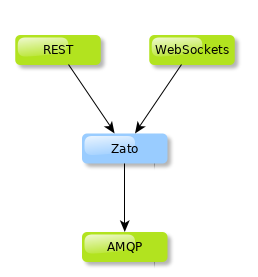
Not granting frontend API clients direct access to backend systems is usually a good idea because the dynamics involved in creation of systems on either side are typically very different. But they still need to communicate and hence the usage of Zato as an API gateway.
Python code
First, let's show the Python code that is needed to integrate the systems in our architecture:
# -*- coding: utf-8 -*-

# Zato
from zato.server.service import Service

class APIGateway(Service):
    """ Dispatches requests to backend systems, enriching them along the way.
    """
    name = 'api.gateway'

    def handle(self):

        # Enrich incoming request with metadata ..
        self.request.payload['_receiver'] = self.name
        self.request.payload['_correlation_id'] = self.cid
        self.request.payload['_date_received'] = self.time.utcnow()

        # .. AMQP configuration ..
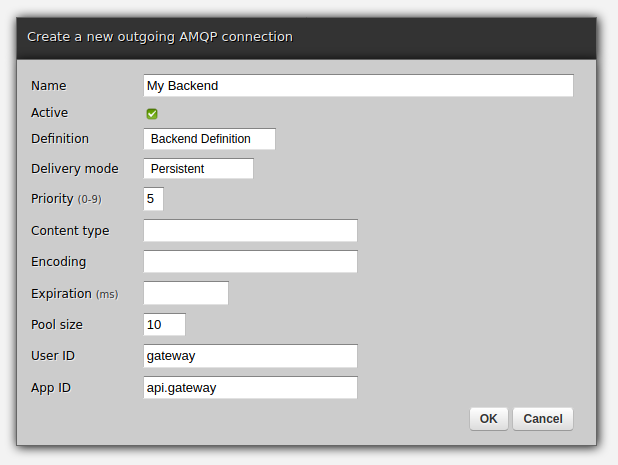
        outconn = 'My Backend'
        exchange = '/incoming'
        routing_key = 'api'

        # .. publish the message to an AMQP broker ..
        self.out.amqp.send(data, outconn, exchange, routing_key)

        # .. and return a response to our API client.
        self.response.payload = {'result': 'OK, data accepted'}
There are a couple of points of interest:
-
The gateway service enriches incoming requests with metadata but it could very well enrich it with business data too, e.g. it could communicate with yet another system to obtain required information and only then pass the request to the final backend system(s)
-
In its current form we send all the information to AMQP brokers only but we could just as well send it to other systems, possibly modifying the requests along the way
-
The code is very abstract and all of its current configuration could be moved to a config file, Redis or another data source to make it even more high-level
-
Security configuration and other details are not declared directly in the body of the gateway service but they need to exist somewhere - we will describe it in the next section
Configuration
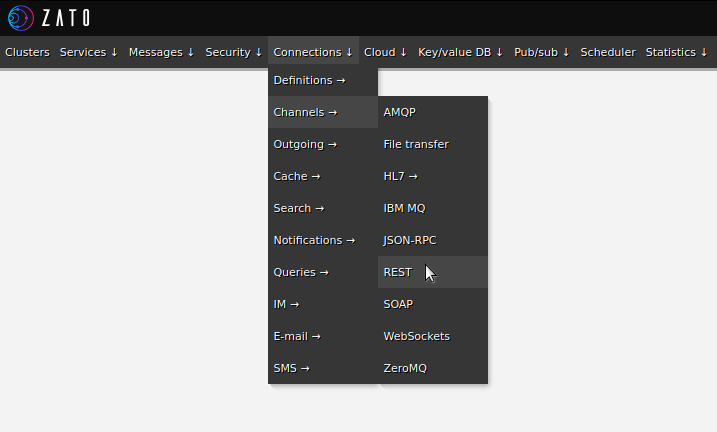
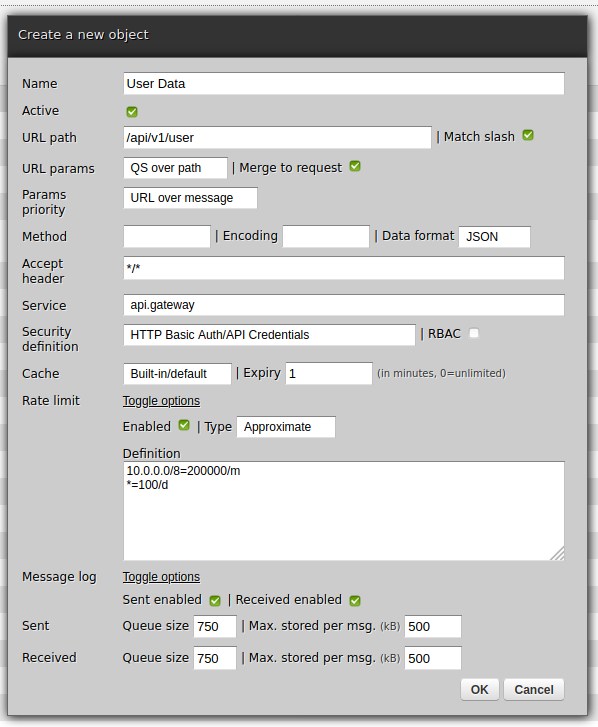
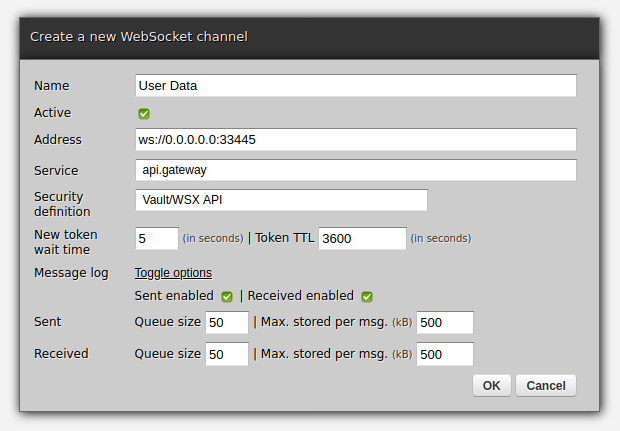
In Zato, API clients access the platform's services using channels - let's create a channel for REST and WebSockets then.
First REST:
Now WebSockets:
We create a new outgoing AMQP connection in the same way:
Using the API gateway
At this point, the gateway is ready - you can invoke it from REST or WebSockets and any JSON data it receives will be processed by the gateway service, the AMQP broker will receive it, and API clients will have replies from the gateway as JSON responses.
Let's use curl to invoke the REST channel with JSON payload on input:
  $ curl http://api:<password-here>@localhost:11223/api/v1/user ; echo
  curl --data-binary @request.json http://localhost:11223/api/v1/user ; echo
  {"result": "OK, data accepted"}
  $
Taken together, the channels and the service allowed us to achieve this:
- Multiple API clients can access the backend AMQP systems, each client using its own preferred technology
- Client credentials are checked on input, before the service starts to process requests (authentication)
- It is possible to assign RBAC roles to clients, in this way ensuring they have access only to selected parts of the backend API (authorization)
- Message logs keep track of data incoming and outgoing
- Responses from channels can be cached which lessens the burden put on the shoulders of backend systems
- Services accepting requests are free to modify, enrich and transform the data in any way required by business logic. E.g., in the code above we only add metadata but we could as well reach out to other applications before requests are sent to the intended recipients.
We can take it further. For instance, the gateway service is currently completely oblivious to the actual content of the requests.
But, since we just have a regular Python dict in self.request.payload, we can with no effort modify the service to dispatch requests to different backend systems, depending on what the request contains or possibly what other backend systems decide the destination should be.
Such additional logic is specific to each environment or project which is why it is not shown here, and this is also why we end the article at this point, but the central part of it all is already done, the rest is only a matter of customization and plugging in more channels for API clients or outgoing connections for backend systems.
Finally, it is perfectly fine to split access to systems among multiple gateways - each may handle requests from selected technologies on the one hand but on the other hand, each may use different caching or rate-limiting policies. If there is more than one, it may be easier to configure such details on a per-gateway basis.
Next steps
- Read more about using Python in API integrations
- Start the tutorial which will guide you how to design and build Python API services for automation and integrations
Seth Michael Larson
Backup Game Boy ROMs and saves on Ubuntu
Backup Game Boy ROMs and saves on Ubuntu
I'm a big fan of retro video games, specifically the Game Boy Color, Advance, and GameCube collections. The physicality of cartridges, link cables, and accessories before the internet was widely available for gaming has a special place in my heart.
With the recent changes to the App Store to allow emulators (and judging by the influx of issues opened on the Delta emulator GitHub repo) there is a growing interest in playing these games on mobile devices.
So if you're using Ubuntu like me, how can you backup your ROMs and saves?

What you'll need
To backup data from Game Boy cartridges I used the following software and hardware:
- Game Boy, GBC, or GBA cartridge
- GB Operator from Epilogue ($50 USD + shipping)
- Playback software from Epilogue
- Epilogue includes a USB-C to USB-A connector, so an adapter may be needed
There are other options for backing up Game Boy ROMs and saves, some of which are less expensive than the GB Operator, but I went with the GB Operator because it explicitly listed Linux support and from watching reviews appeared to provide a streamlined experience.
Getting started with GB Operator and Playback
Download the Playback AppImage for Linux and the CPU architecture you have. Make the AppImage file executable with:
$ chmod a+x ./Playback.AppImage
If you try to execute this file ($ ./Playback.AppImage) and receive this error:
dlopen(): error loading libfuse.so.2

AppImages require FUSE to run.
You might still be able to extract the contents of this AppImage
if you run it with the --appimage-extract option.
See https://github.com/AppImage/AppImageKit/wiki/FUSE
for more information
You'll need to install FUSE on Ubuntu:
$ sudo apt-get install libfuse2
After this you should be able to run Playback:
$ ./Playback.AppImage
From here the application should launch, but even if you have your GB Operator plugged in there's a chance it won't be detected. There's a good chance that your current user doesn't have access to the USB device. Epilogue provides some guides on how to enable access.
After following the above guide and logging in and out for the changes to take effect your GB Operator should be detected. Connecting a cartridge and navigating to "Data" in the menus provides you with options to "Backup Game" and "Backup Save".
Selecting these options might trigger a crash with the following error when starting the export process:
(Playback.AppImage:44475): Gtk-WARNING **: 15:05:20.886: Could not load a pixbuf from icon theme.
This may indicate that pixbuf loaders or the mime database could not be found.
**
Gtk:ERROR:../../../../gtk/gtkiconhelper.c:494:ensure_surface_for_gicon: assertion failed (error == NULL): Failed to load /usr/share/icons/Yaru/16x16/status/image-missing.png: Unrecognized image file format (gdk-pixbuf-error-quark, 3)
Bail out! Gtk:ERROR:../../../../gtk/gtkiconhelper.c:494:ensure_surface_for_gicon: assertion failed (error == NULL): Failed to load /usr/share/icons/Yaru/16x16/status/image-missing.png: Unrecognized image file format (gdk-pixbuf-error-quark, 3)
Aborted (core dumped)
The fix that worked for me came from a Redditor who talked with Epilogue support and received the following answer:
LD_PRELOAD=/usr/lib/x86_64-linux-gnu/gdk-pixbuf-2.0/2.10.0/loaders/libpixbufloader-svg.so \
  ./Playback.AppImage
Running the AppImage with the LD_PRELOAD value set fixed my issue, I've since added this
shim to an alias, so I don't have to remember it. Hopefully in a future version of Playback
this won't be an issue.
From here backing up your ROMs and saves should work as expected. Happy gaming!
Thanks for reading! ♡ Did you find this article helpful and want more content like it? Get notified of new posts by subscribing to the RSS feed or the email newsletter.
This work is licensed under CC BY-SA 4.0 


HoloViz
Plotting made easy with hvPlot: 0.9 and 0.10 releases
May 05, 2024
Doug Hellmann
sphinxcontrib-sqltable 2.1.0 - SQLAlchemy 2.0 support
What’s new in 2.1.0? update packaging to use pyproject.toml Update sqltable.py to support SQLAlchemy 2.0 (contributions by Gabriel Gaona) Pin SQLAlchemy>=2.0 to prevent backwards incompatibility with changes to the query execution interface. (contributions by Gabriel Gaona) fix up python version support list Fix the obsolete link to bitbucket (contributions by kbaikov) find the sample schema file depending on how sphinx is invoked move sample database to /tmp for rtd.org
Django Weblog
Last call for DjangoCon Europe 2025 organizers
Note: This text is an updated and clarified version of the previous call. We have opened up more 2025 event dates; targeting January - April and now also June 2025.
DjangoCon Europe is a major pillar of the Django community, as people from across the world meet and share. This includes many qualities that make it a unique event - unconventional and conventional venues, creative happenings, a feast of talks and a dedication to inclusion and diversity.
Ahead of DjangoCon Europe 2024, we are looking for the next group of organizers to own and lead the 2025 conference. Could your town - or your football stadium, circus tent, private island or city hall - host this wonderful community event?
Hosting a DjangoCon is an ambitious undertaking. It's hard work, but each year it has been successfully run by a team of community volunteers, not all of whom have had previous experience - more important is enthusiasm, organizational skills, the ability to plan and manage budgets, time and people - and plenty of time to invest in the project.
Step 1: Submit your expression of interest
If you’re considering organizing DjangoCon Europe (🙌 great!), fill in our DjangoCon Europe 2025 expression of interest form with your contact details. No need to fill in all the information at this stage, we’ll reach out and help you figure it out.
Express your interest in organizing
Step 2: We’re here to help!
We've set up a DjangoCon Europe support working group of previous organizers that you can reach out to with questions about organizing and running a DjangoCon Europe.
The group will be in touch with everyone submitting the expression of interest form , or you can reach out to them directly: european-organizers-support@djangoproject.com
We'd love to hear from you as soon as possible, so your proposal can be finalized and sent to the DSF board by June 2nd. If time permits, the selected hosts will be publicly announced at this year's DjangoCon Europe by the current organizers.
Step 3: Submitting the proposal
The more detailed and complete your final proposal is, the better. Basic details include:
- Organizing committee members: You won’t have a full team yet, probably, naming just some core team members is enough.
- The legal entity that is intended to run the conference: Even if the entity does not exist yet, please share how you are planning to set it up.
- Dates: We must avoid conflicts with major holidays, EuroPython, DjangoCon US, and PyCon US.
- Venue(s), including size, number of possible attendees, pictures, accessibility concerns, catering, etc. Possible dates for 2025 are January 5th to April 30th, and June 1st to June 30th.
- Transport links and accommodation: Can your venue be reached by international travelers?
- Budgets and ticket prices: Talk to the DjangoCon Europe Support group to get help with this, including information on past event budgets.
We also like to see:
- Timelines
- Pictures
- Draft agreements with providers
- Alternatives you have considered
Submit your completed proposal via our DjangoCon Europe 2025 expression of interest form, this time filling in as many fields as possible. We look forward to reviewing great proposals that continue the excellence the whole community associates with DjangoCon Europe.
Q&A
Can I organize a conference alone?
We strongly recommend that a team of people submit an application.
I/we don’t have a legal entity yet, is that a problem?
Depending on your jurisdiction, this is usually not a problem. But please share your plans about the entity you will use or form in your application.
Do I/we need experience with organizing conferences?
The support group is here to help you succeed. From experience, we know that many core groups of 2-3 people have been able to run a DjangoCon with guidance from previous organizers and help from volunteers.
What is required in order to announce an event?
Ultimately, a contract with the venue confirming the dates is crucial, since announcing a conference makes people book calendars, holidays, buy transportation and accommodation etc. This, however, would only be relevant after the DSF board has concluded the application process. Naturally, the application itself cannot contain any guarantees, but it’s good to check concrete dates with your venues to ensure they are actually open and currently available, before suggesting these dates in the application.
Do we have to do everything ourselves?
No. You will definitely be offered lots of help by the community. Typically, conference organizers will divide responsibilities into different teams, making it possible for more volunteers to join. Local organizers are free to choose which areas they want to invite the community to help out with, and a call will go out through a blog post announcement on djangoproject.com and social media.
What kind of support can we expect from the Django Software Foundation?
The DSF regularly provides grant funding to DjangoCon organizers, to the extent of $6,000 in recent editions. We also offer support via specific working groups:
- The dedicated DjangoCon Europe support working group.
- The social media working group can help you promote the event.
- The Code of Conduct working group works with all event organizers.
In addition, a lot of Individual Members of the DSF regularly volunteer at community events. If your team aren’t Individual Members, we can reach out to them on your behalf to find volunteers.
What dates are possible in 2025?
For 2025, DjangoCon Europe should ideally happen between January 5th and April 30th, or June 1st and June 30th. This is to avoid the following community events’ provisional dates:
- PyCon US 2025: 14 May through 22 May, 2025
- EuroPython 2025: July 2025
- DjangoCon US 2025: September - October 2025
- DjangoCon Africa 2025: August - September 2025
Here are the holidays to avoid:
- New Year's Day: Wednesday 1st January 2025
- Chinese New Year: Wednesday 29th January 2025
- Eid Al-Fitr: Sunday 30th March 2025
- Passover: Saturday 12th - Sunday 20th April 2025
- Easter: Sunday 20th April 2025
- Eid Al-Adha: Friday 6th - Monday 9th June 2025
- Rosh Hashanah : Monday 22nd - Wednesday 24th September 2025
- Yom Kippur: Wednesday 1st - Thursday 2nd October 2025
What cities or countries are possible?
Any city in Europe. This can be a city or country where DjangoCon Europe has happened in the past (Edinburgh, Porto, Copenhagen, Heidelberg, Florence, Budapest, Cardiff, Toulon, Warsaw, Zurich, Amsterdam, Berlin), or a new locale.
Eli Bendersky
My favorite prime number generator
Many years ago I've re-posted a Stack Overflow answer with Python code for a terse prime sieve function that generates a potentially infinite sequence of prime numbers ("potentially" because it will run out of memory eventually). Since then, I've used this code many times - mostly because it's short and clear. In this post I will explain how this code works, where it comes from (I didn't come up with it), and some potential optimizations. If you want a teaser, here it is:
def gen_primes():
    """Generate an infinite sequence of prime numbers."""
    D = {}
    q = 2
    while True:
        if q not in D:
            D[q * q] = [q]
            yield q
        else:
            for p in D[q]:
                D.setdefault(p + q, []).append(p)
            del D[q]
        q += 1
The sieve of Eratosthenes
To understand what this code does, we should first start with the basic Sieve of Eratosthenes; if you're familiar with it, feel free to skip this section.
The Sieve of Eratosthenes is a well-known algorithm from ancient Greek times for finding all the primes below a certain number reasonably efficiently using a tabular representation. This animation from Wikipedia explains it pretty well:
Starting with the first prime (2) it marks all its multiples until the requested limit. It then takes the next unmarked number, assumes it's a prime (because it is not a multiple of a smaller prime), and marks its multiples, and so on until all the multiples below the limit are marked. The remaining unmarked numbers are primes.
Here's a well-commented, basic Python implementation:
def gen_primes_upto(n):
    """Generates a sequence of primes < n.

    Uses the full sieve of Eratosthenes with O(n) memory.
    """
    if n == 2:
        return

    # Initialize table; True means "prime", initially assuming all numbers
    # are prime.
    table = [True] * n
    sqrtn = int(math.ceil(math.sqrt(n)))

    # Starting with 2, for each True (prime) number I in the table, mark all
    # its multiples as composite (starting with I*I, since earlier multiples
    # should have already been marked as multiples of smaller primes).
    # At the end of this process, the remaining True items in the table are
    # primes, and the False items are composites.
    for i in range(2, sqrtn):
        if table[i]:
            for j in range(i * i, n, i):
                table[j] = False

    # Yield all the primes in the table.
    yield 2
    for i in range(3, n, 2):
        if table[i]:
            yield i
When we want a list of all the primes below some known limit, gen_primes_upto is great, and performs fairly well. There are two issues with it, though:
- We have to know what the limit is ahead of time; this isn't always possible or convenient.
- Its memory usage is high - O(n); this can be significantly optimized, however; see the bonus section at the end of the post for details.
The infinite prime generator
Back to the infinite prime generator that's in the focus of this post. Here is its code again, now with some comments:
def gen_primes():
    """Generate an infinite sequence of prime numbers."""
    # Maps composites to primes witnessing their compositeness.
    D = {}

    # The running integer that's checked for primeness
    q = 2

    while True:
        if q not in D:
            # q is a new prime.
            # Yield it and mark its first multiple that isn't
            # already marked in previous iterations
            D[q * q] = [q]
            yield q
        else:
            # q is composite. D[q] holds some of the primes that
            # divide it. Since we've reached q, we no longer
            # need it in the map, but we'll mark the next
            # multiples of its witnesses to prepare for larger
            # numbers
            for p in D[q]:
                D.setdefault(p + q, []).append(p)
            del D[q]

        q += 1
The key to the algorithm is the map D. It holds all the primes encountered so far, but not as keys! Rather, they are stored as values, with the keys being the next composite number they divide. This lets the program avoid having to divide each number it encounters by all the primes known so far - it can simply look in the map. A number that's not in the map is a new prime, and the way the map updates is not unlike the sieve of Eratosthenes - when a composite is removed, we add the next composite multiple of the same prime(s). This is guaranteed to cover all the composite numbers, while prime numbers should never be keys in D.
I highly recommend instrumenting this function with some printouts and running through a sample invocation - it makes it easy to understand how the algorithm makes progress.
Compared to the full sieve gen_primes_upto, this function doesn't require us to know the limit ahead of time - it will keep producing prime numbers ad infinitum (but will run out of memory eventually). As for memory usage, the D map has all the primes in it somewhere, but each one appears only once. So its size is O(\pi(n)), where \pi(n) is the Prime-counting function, the number of primes smaller or equal to n. This can be approximated by O(\frac{n}{ln(n)}) [1].
I don't remember where I first saw this approach mentioned, but all the breadcrumbs lead to this ActiveState Recipe by David Eppstein from way back in 2002.
Optimizing the generator
I really like gen_primes; it's short, easy to understand and gives me as many primes as I need without forcing me to know what limit to use, and its memory usage is much more reasonable than the full-blown sieve of Eratosthenes. It is, however, also quite slow, over 5x slower than gen_primes_upto.
The aforementioned ActiveState Recipe thread has several optimization ideas; here's a version that incorporates ideas from Alex Martelli, Tim Hochberg and Wolfgang Beneicke:
def gen_primes_opt():
    yield 2
    D = {}
    for q in itertools.count(3, step=2):
        p = D.pop(q, None)
        if not p:
            D[q * q] = q
            yield q
        else:
            x = q + p + p  # get odd multiples
            while x in D:
                x += p + p
            D[x] = p
The optimizations are:
- Instead of holding a list as the value of D, just have a single number. In cases where we need more than one witness to a composite, find the next multiple of the witness and assign that instead (this is the while x in D inner loop in the else clause). This is a bit like using linear probing in a hash table instead of having a list per bucket.
- Skip even numbers by starting with 2 and then proceeding from 3 in steps of 2.
- The loop assigning the next multiple of witnesses may land on even numbers (when p and q are both odd). So instead jump to q + p + p directly, which is guaranteed to be odd.
With these in place, the function is more than 3x faster than before, and is now only within 40% or so of gen_primes_upto, while remaining short and reasonably clear.
There are even fancier algorithms that use interesting mathematical tricks to do less work. Here's an approach by Will Ness and Tim Peters (yes, that Tim Peters) that's reportedly faster. It uses the wheels idea from this paper by Sorenson. Some additional details on this approach are available here. This algorithm is both faster and consumes less memory; on the other hand, it's no longer short and simple.
To be honest, it always feels a bit odd to me to painfully optimize Python code, when switching languages provides vastly bigger benefits. For example, I threw together the same algorithms using Go and its experimental iterator support; it's 3x faster than the Python version, with very little effort (even though the new Go iterators and yield functions are still in the proposal stage and aren't optimized). I can't try to rewrite it in C++ or Rust for now, due to the lack of generator support; the yield statement is what makes this code so nice and elegant, and alternative idioms are much less convenient.
Bonus: segmented sieve of Eratosthenes
The Wikipedia article on the sieve of Eratosthenes mentions a segmented approach, which is also described in the Sorenson paper in section 5.
The main insight is that we only need the primes up to \sqrt{n} to be able to sieve a table all the way to N. This results in a sieve that uses only O(\sqrt{n}) memory. Here's a commented Python implementation:
def gen_primes_upto_segmented(n):
    """Generates a sequence of primes < n.

    Uses the segmented sieve or Eratosthenes algorithm with O(√n) memory.
    """
    # Simplify boundary cases by hard-coding some small primes.
    if n < 11:
        for p in [2, 3, 5, 7]:
            if p < n:
                yield p
        return

    # We break the range [0..n) into segments of size √n
    segsize = int(math.ceil(math.sqrt(n)))

    # Find the primes in the first segment by calling the basic sieve on that
    # segment (its memory usage will be O(√n)). We'll use these primes to
    # sieve all subsequent segments.
    baseprimes = list(gen_primes_upto(segsize))
    for bp in baseprimes:
        yield bp

    for segstart in range(segsize, n, segsize):
        # Create a new table of size √n for each segment; the old table
        # is thrown away, so the total memory use here is √n
        # seg[i] represents the number segstart+i
        seg = [True] * segsize

        for bp in baseprimes:
            # The first multiple of bp in this segment can be calculated using
            # modulo.
            first_multiple = (
                segstart if segstart % bp == 0 else segstart + bp - segstart % bp
            )
            # Mark all multiples of bp in the segment as composite.
            for q in range(first_multiple, segstart + segsize, bp):
                seg[q % len(seg)] = False

        # Sieving is done; yield all composites in the segment (iterating only
        # over the odd ones).
        start = 1 if segstart % 2 == 0 else 0
        for i in range(start, len(seg), 2):
            if seg[i]:
                if segstart + i >= n:
                    break
                yield segstart + i
Code
The full code for this post - along with tests and benchmarks - is available on GitHub.
| [1] | While this is a strong improvement over O(n) (e.g. for a billion primes, memory usage here is only 5% of the full sieve version), it still depends on the size of the input. In the unlikely event that you need to generate truly gigantic primes starting from 2, even the square-root-space solutions become infeasible. In this case, the whole approach should be changed; instead, one would just generate random huge numbers and use probabilistic primality testing to check for their primeness. This is what real libraries like Go's crypto/rand.Prime do. |
Faster XML stream processing in Go
XML processing was all the rage 15 years ago; while it's less prominent these days, it's still an important task in some application domains. In this post I'm going to compare the speed of stream-processing huge XML files in Go, Python and C and finish up with a new, minimal module that uses C to accelerate this task for Go. All the code shown throughout this post is available in this GitHub repository the new Go module is here.
What does XML stream processing mean?
First, let's define the problem at hand in more detail. Roughly speaking, there are two ways we can process data from a file:
- Read the whole file into memory at once, and then proces the data in memory.
- Read the file in chunks, process each chuck, without having the whole data in memory at any given time.
In many ways, (1) is more convenient because we can easily go back to any part of the file. However, in some situations (2) is essential; specifically, when the file is very large. This is where stream processing comes in. If our input file is 500 GiB, we're unlikely to be able to read it into memory and have to process it in parts. Even for smaller files that would theoretically fit into RAM, it's not always a good idea to read them wholly; this dramatically increases the active heap size and can cause performance issues in garbage-collected languages.
The task
For this benchmark, I'm using xmlgen to create a 230 MiB XML file [1]. A tiny fragment of the file may look like this:
<?xml version="1.0" standalone="yes"?>
<site>
  <regions>
    <asia>
      <item id="item0">
        <location>United States</location>
        <quantity>1</quantity>
        <name>duteous nine eighteen </name>
        <payment>Creditcard</payment>
        ...
      </item>
    </asia>
  </regions>
</site>
The task is to find how many times "Africa" appears in the data of the <location> tag throughout the document.
Baseline - using the Go standard library
Let's start with a baseline implementation - using the standard library's encoding/xml package. While the package's Unmarshal mode will parse the whole file in one go, it can also be used to process XML token by token and selectively parse interesting elements. Here is the code:
package main

import (
  "encoding/xml"
  "fmt"
  "io"
  "log"
  "os"
  "strings"
)

type location struct {
  Data string `xml:",chardata"`
}

func main() {
  f, err := os.Open(os.Args[1])
  if err != nil {
    log.Fatal(err)
  }
  defer f.Close()

  d := xml.NewDecoder(f)
  count := 0
  for {
    tok, err := d.Token()
    if tok == nil || err == io.EOF {
      // EOF means we're done.
      break
    } else if err != nil {
      log.Fatalf("Error decoding token: %s", err)
    }

    switch ty := tok.(type) {
    case xml.StartElement:
      if ty.Name.Local == "location" {
        // If this is a start element named "location", parse this element
        // fully.
        var loc location
        if err = d.DecodeElement(&loc, &ty); err != nil {
          log.Fatalf("Error decoding item: %s", err)
        }
        if strings.Contains(loc.Data, "Africa") {
          count++
        }
      }
    default:
    }
  }

  fmt.Println("count =", count)
}
I made sure to double check that the memory usage of this program stays bounded and low while processing a large file - the maximum RSS was under 7 MiB while processing our 230 MiB input file. I'm verifying this for all the programs presented in this post using /usr/bin/time -v on Linux.
This program takes 6.24 seconds to process the whole file and print out the result.
Python implementation
The first Python implementation uses the xml.etree.ElementTree module from the standard library:
import sys
import xml.etree.ElementTree as ET

count = 0
for event, elem in ET.iterparse(sys.argv[1], events=("end",)):
    if event == "end":
        if elem.tag == 'location' and elem.text and 'Africa' in elem.text:
            count += 1
        elem.clear()

print('count =', count)
The key here is the elem.clear() call. It ensures that each element gets discarded afer parsing it fully, so the memory usage won't grow linearly with the size of the file (unless the file is pathological). This program takes 3.7 seconds to process the whole file - much faster than our Go program. Why is that?
While the Go program uses 100% Go code for the task (encoding/xml is implemented entirely in Go), the Python program is using a C extension (most of ElementTree is written in C) wrapping a fast XML parser in C - libexpat. The bulk of the work here is done in C, which is faster than Go. The performance of encoding/xml is further discussed in this issue, though it's an old one and the performance has been somewhat optimized since then.
An alternative XML parsing library for Python is lxml, which uses libxml underneath. Here's a Python version using lxml:
import sys
from lxml import etree

count = 0
for event, elem in etree.iterparse(sys.argv[1], events=("end",)):
    if event == "end":
        if elem.tag == 'location' and elem.text and 'Africa' in elem.text:
            count += 1
        elem.clear()

print('count =', count)
This looks very similar to the previous version, and that's on purpose. lxml has an etree-compatible API to make transition from the standard library smoother. This version also takes around 3.7 seconds for our 230 MiB file.
The reason I'm including lxml here is that it will run faster than xml.etree.ElementTree when slurping the whole file, for our particular file size. I want to highlight that this is outside of the scope for my experiment, because I only care about streaming processing. The only way (that I'm aware of!) to successfully process a 500 GiB file with lxml would be by using iterparse.
How fast can it run?
Based on the measurements presented here, Go is about 68% slower than Python for parsing a large XML file in a streaming fashion. While Go usually compiles to a much faster code than pure Python, the Python implementations have the backing of efficient C libraries with which it's difficult to compete. I was curious to know how fast it could be, in theory [2].
To answer this question, I implemented the same program using pure C with libxml, which has a SAX API. I won't paste it wholly here because it's longer, but you can find the full source code on GitHub. It takes just 0.56 seconds to process our 230 MiB input file, which is very impressive given the other results, but also not very surprising. This is C, after all.
You may wonder - if lxml uses libxml underneath, why is it so much slower than the pure C version? The answer is Python call overhead. The lxml version calls back into Python for every parsed element, which incurs a significant cost [3]. Another reason is that my C implementation doesn't actually parse an element - it's just a simple event-based state machine, so there's less extra work being done.
Using libxml from Go
To recap where we are so far:
- Python libraries based on underlying C implementations are faster than pure Go.
- Pure C is much faster still.
We have two options: we can either try to optimize Go's encoding/xml package, or we can try to wrap a fast C library with Go. While the former is a worthy goal, it involves a large effort and should be a topic for a separate post. Here, I'll go for the latter.
Seaching around the web, I found a few wrappers around libxml. Two that seemed moderately popular and maintained are https://github.com/lestrrat-go/libxml2 and https://github.com/moovweb/gokogiri. Unfortunately, neither of these (or the other bindings I found) are exposing the SAX API of libxml; instead, they focus on the DOM API, where the whole document is parsed by the underlying library and a tree is returned. As mentioned above, we need the SAX interface to process huge files.
gosax
It's time to roll our own :-) I wrote the gosax module, which uses Cgo to call into libxml and exposes a SAX interface [4]. Implementing it was an interesting exercise in Cgo, because it requires some non-trivial concepts like registering Go callbacks with C.
Here's a version of our program using gosax:
package main

import (
  "fmt"
  "os"
  "strings"

  "github.com/eliben/gosax"
)

func main() {
  counter := 0
  inLocation := false

  scb := gosax.SaxCallbacks{
    StartElement: func(name string, attrs []string) {
      if name == "location" {
        inLocation = true
      } else {
        inLocation = false
      }
    },

    EndElement: func(name string) {
      inLocation = false
    },

    Characters: func(contents string) {
      if inLocation && strings.Contains(contents, "Africa") {
        counter++
      }
    },
  }

  err := gosax.ParseFile(os.Args[1], scb)
  if err != nil {
    panic(err)
  }

  fmt.Println("counter =", counter)
}
As you can see, it implements a state machine that remembers being inside a location element, where the character data is checked. This program takes 4.03 seconds to process our input file. Not bad! But we can do a bit better, and with a couple of optimizations I managed to bring it down to 3.68 seconds - about the same speed as the Python implementations!
IMHO the roughly similar run times here are a coincidence, because the Python programs are different from my approach in that they expose a higher-level API than pure SAX. Recall that iterparse returns a parsed element, and we can access its text attribute, etc. In gosax, we have to do this much more manually. Since the the cost of calls between Cgo and Go is rather high, there is an optimization opportunity here for gosax. We could do more work in C - parsing a full element, and returning it wholly to Go. This would move work from the Go side to the C side, as well as reduce the number of cross-language calls. But this is a task for another day.
Conclusion
Well, this was fun :-) There are 5 different implementations of the same simple task described here, in 3 different programming languages. Here is a summary of the speed measurements we got:
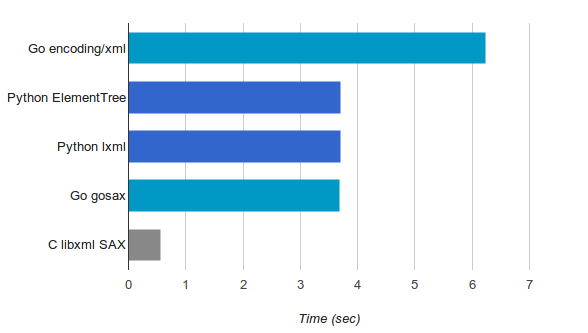
Python's performance story has always been - "it's probably fast enough, and in the rare cases where it isn't, use a C extension". In Go the narrative is somewhat different: in most cases, the Go compiler produces fairly fast code. Pure Go code is significantly faster than Python and often faster than Java. Even so, every once in a while it may be useful to dip into C or C++ for performance, and in these cases Cgo is a good approach.
It's obvious that encoding/xml needs some work w.r.t. performance, but until that happens - there are good alternatives! Leveraging the speed of libxml has been possible for the DOM API, and now is possible for the SAX API as well. In the long run, I believe that serious performance work on encoding/xml can make it go faster than the libxml wrappers because it would elimitate the high cost of C-to-Go calls.
| [1] | This size will easily fit in RAM, but it's good enough to provide a meaningful benchmarking duration. |
| [2] | When working on optimizations, it's often useful to know "the speed of light" of some computation. Say we want to optimize some function in our program. It's worth asking - how much faster will the program be if this function takes 0 time? If the overall change is tiny, the function is not worth optimizing, most likely. This is just a practical application of Amdahl's law. |
| [3] | We can test this hypothesis by timing how long it takes the non-streaming API in lxml to parse the same file. Since it parses the whole XML file in C before returning the parsed structure to Python, we expect the Python call overhead to be much smaller. Indeed, for files that fit into memory this is faster. But once again, in this post we return our attention to streaming APIs - assuming this is our only choice for gigantic files. |
| [4] | gosax is very minimal, only providing the most common SAX callbacks. The decision to create a new module was just for convenience and speed; the more correct thing would have likely been to contribute to one of the existing libxml wrappers. I don't see gosax as production-quality at this stage - I just hacked it together to be able to experiment for this post. |
Type inference
Type inference is a major feature of several programming languages, most notably languages from the ML family like Haskell. In this post I want to provide a brief overview of type inference, along with a simple Python implementation for a toy ML-like language.
Uni-directional type inference
While static typing is very useful, one of its potential downsides is verbosity. The programmer has to annotate values with types throughout the code, which results in more effort and clutter. What's really annoying, though, is that in many cases these annotations feel superfluous. Consider this classical C++ example from pre-C++11 times:
std::vector<Blob*> blobs;
std::vector<Blob*>::iterator iter = blobs.begin();
Clearly when the compiler sees blobs.begin(), it knows the type of blobs, so it also knows the type of the begin() method invoked on it because it is familiar with the declaration of begin. Why should the programmer be burdened with spelling out the type of the iterator? Indeed, one of the most welcome changes in C++11 was lifting this burden by repurposing auto for basic type inference:
std::vector<Blob*> blobs;
auto iter = blobs.begin();
Go has a similar capability with the := syntax. Given some function:
func parseThing(...) (Node, error) {
}
We can simply write:
node, err := parseThing(...)
Without having to explicitly declare that node has type Node and err has type error.
These features are certainly useful, and they involve some degree of type inference from the compiler. Some functional programming proponents say this is not real type inference, but I think the difference is just a matter of degree. There's certainly some inference going on here, with the compiler calculating and assigning the right types for expressions without the programmer's help. Since this calculation flows in one direction (from the declaration of the vector::begin method to the auto assignment), I'll call it uni-directional type inference [1].
Bi-directional type inference (Hindley-Milner)
If we define a new map function in Haskell to map a function over a list, we can do it as follows:
mymap f [] = []
mymap f (first:rest) = f first : mymap f rest
Note that we did not specify the types for either the arguments of mymap, or its return value. The Haskell compiler can infer them on its own, using the definition provided:
> :t Main.mymap
Main.mymap :: (t1 -> t) -> [t1] -> [t]
The compiler has determined that the first argument of mymap is a generic function, assigning its argument the type t1 and its return value the type t. The second argument of mymap has the type [t1], which means "list of t1"; then the return value of mymap has the type "list of t". How was this accomplished?
Let's start with the second argument. From the [] = [] variant, and also from the (first:rest) deconstruction, the compiler infers it has a list type. But there's nothing else in the code constraining the element type, so the compiler chooses a generic type specifier - t1. f first applies f to an element of this list, so f has to take t1; nothing constrains its return value type, so it gets the generic t. The result is f has type (t1 -> t), which in Haskell parlance means "a function from t1 to t".
Here is another example, written in a toy language I put together for the sake of this post. The language is called microml, and its implementation is described at the end of the post:
foo f g x = if f(x == 1) then g(x) else 20
Here foo is declared as a function with three arguments. What is its type? Let's try to run type inference manually. First, note that the body of the function consists of an if expresssion. As is common in programming languages, this one has some strict typing rules in microml; namely, the type of the condition is boolean (Bool), and the types of the then and else clauses must match.
So we know that f(x == 1) has to return a Bool. Moreover, since x is compared to an integer, x is an Int. What is the type of g? Well, it has an Int argument, and it return value must match the type of the else clause, which is an Int as well.
To summarize:
- The type of x is Int
- The type of f is Bool -> Bool
- The type of g is Int -> Int
So the overall type of foo is:
((Bool -> Bool), (Int -> Int), Int) -> Int
It takes three arguments, the types of which we have determined, and returns an Int.
Note how this type inference process is not just going in one direction, but seems to be "jumping around" the body of the function figuring out known types due to typing rules. This is why I call it bi-directional type inference, but it's much better known as Hindley-Milner type inference, since it was independently discovered by Roger Hindley in 1969 and Robin Milner in 1978.
How Hindley-Milner type inference works
We've seen a couple of examples of manually running type inference on some code above. Now let's see how to translate it to an implementable algorithm. I'm going to present the process in several separate stages, for simplicity. Some other presentations of the algorithm combine several of these stages, but seeing them separately is more educational, IMHO.
The stages are:
- Assign symbolic type names (like t1, t2, ...) to all subexpressions.
- Using the language's typing rules, write a list of type equations (or constraints) in terms of these type names.
- Solve the list of type equations using unification.
Let's use this example again:
foo f g x = if f(x == 1) then g(x) else 20
Starting with stage 1, we'll list all subexpressions in this declaration (starting with the declaration itself) and assign unique type names to them:
foo                                       t0
f                                         t1
g                                         t2
x                                         t3
if f(x == 1) then g(x) else 20            t4
f(x == 1)                                 t5
x == 1                                    t6
x                                         t3
g(x)                                      t7
20                                        Int
Note that every subexpression gets a type, and we de-duplicate them (e.g. x is encountered twice and gets the same type name assigned). Constant nodes get known types.
In stage 2, we'll use the language's typing rules to write down equations involving these type names. Usually books and papers use slightly scary formal notation for typing rules; for example, for if:
\[\frac{\Gamma \vdash e_0 : Bool, \Gamma \vdash e_1 : T, \Gamma \vdash e_2 : T}{\Gamma \vdash if\: e_0\: then\: e_1\: else\: e_2 : T}\]All this means is the intuitive typing of if we've described above: the condition is expected to be boolean, and the types of the then and else clauses are expected to match, and their type becomes the type of the whole expression.
To unravel the notation, prepend "given that" to the expression above the line and "we can derive" to the expression below the line; \Gamma \vdash e_0 : Bool means that e_0 is typed to Bool in the set of typing assumptions called \Gamma.
Similarly, a typing rule for single-argument function application would be:
\[\frac{\Gamma \vdash e_0 : T, \Gamma \vdash f : T \rightarrow U}{\Gamma \vdash f(e_0) : U}\]The real trick of type inference is running these typing rules in reverse. The rule tells us how to assign types to the whole expression given its constituent types, but we can also use it as an equation that works both ways and lets us infer constituent types from the whole expression's type.
Let's see what equations we can come up with, looking at the code:
From f(x == 1) we infer t1 = (t6 -> t5), because t1 is the type of f, t6 is the type of x == 1, and t5 is the type of f(x == 1). Note that we're using the typing rules for function application here. Moreover, we can infer that t3 is Int and t6 is Bool because of the typing rule of the == operator.
Similarly, from g(x) we infer t2 = (t3 -> t7).
From the if expression, we infer that t6 is Bool (since it's the condition of the if) and that t4 = Int, because the then and else clauses must match.
Now we have a list of equations, and our task is to find the most general solution, treating the equations as constraints. This is done by using the unification algorithm which I described in detail in the previous post. The solution we're seeking here is precisely the most general unifier.
For our expression, the algorithm will find the type of foo to be:
((Bool -> Bool), (Int -> Int), Int) -> Int)
As expected.
If we make a slight modification to the expression to remove the comparison of x with 1:
foo f g x = if f(x) then g(x) else 20
Then we can no longer constrain the type of x, since all we know about it is that it's passed into functions f and g, and nothing else constrains the arguments of these functions. The type inference process will thus calculate this type for foo:
((a -> Bool), (a -> Int), a) -> Int
It assigns x the generic type name a, and uses it for the arguments of f and g as well.
The implementation
An implementation of microml is available here, as a self-contained Python program that parses a microml declaration and infers its type. The best starting point is main.py, which spells out the stages of type inference:
code = 'foo f g x = if f(x == 1) then g(x) else 20'
print('Code', '----', code, '', sep='\n')

# Parse the microml code snippet into an AST.
p = parser.Parser()
e = p.parse_decl(code)
print('Parsed AST', '----', e, '', sep='\n')

# Stage 1: Assign symbolic typenames
typing.assign_typenames(e.expr)
print('Typename assignment', '----',
      typing.show_type_assignment(e.expr), '', sep='\n')

# Stage 2: Generate a list of type equations
equations = []
typing.generate_equations(e.expr, equations)
print('Equations', '----', sep='\n')
for eq in equations:
    print('{:15} {:20} | {}'.format(str(eq.left), str(eq.right), eq.orig_node))

# Stage 3: Solve equations using unification
unifier = typing.unify_all_equations(equations)
print('', 'Inferred type', '----',
      typing.get_expression_type(e.expr, unifier, rename_types=True),
      sep='\n')
This will print out:
Code
----
foo f g x = if f(x == 1) then g(x) else 20

Parsed AST
----
Decl(foo, Lambda([f, g, x], If(App(f, [(x == 1)]), App(g, [x]), 20)))

Typename assignment
----
Lambda([f, g, x], If(App(f, [(x == 1)]), App(g, [x]), 20))   t0
If(App(f, [(x == 1)]), App(g, [x]), 20)                      t4
App(f, [(x == 1)])                                           t5
f                                                            t1
(x == 1)                                                     t6
x                                                            t3
1                                                            Int
App(g, [x])                                                  t7
g                                                            t2
x                                                            t3
20                                                           Int

Equations
----
Int             Int                  | 1
t3              Int                  | (x == 1)
Int             Int                  | (x == 1)
t6              Bool                 | (x == 1)
t1              (t6 -> t5)           | App(f, [(x == 1)])
t2              (t3 -> t7)           | App(g, [x])
Int             Int                  | 20
t5              Bool                 | If(App(f, [(x == 1)]), App(g, [x]), 20)
t4              t7                   | If(App(f, [(x == 1)]), App(g, [x]), 20)
t4              Int                  | If(App(f, [(x == 1)]), App(g, [x]), 20)
t0              ((t1, t2, t3) -> t4) | Lambda([f, g, x], If(App(f, [(x == 1)]), App(g, [x]), 20))

Inferred type
----
(((Bool -> Bool), (Int -> Int), Int) -> Int)
There are many more examples of type-inferred microml code snippets in the test file test_typing.py. Here's another example which is interesting:
> foo f x = if x then lambda t -> f(t) else lambda j -> f(x)
((Bool -> a), Bool) -> (Bool -> a)
The actual inference is implemented in typing.py, which is fairly well commented and should be easy to understand after reading this post. The trickiest part is probably the unification algorithm, but that one is just a slight adaptation of the algorithm presented in the previous post.
| [1] | After this post was published, it was pointed out that another type checking / inference technique is already called bi-directional (see this paper for example); while it's related to Hindley-Milner (HM), it's a distinct method. Therefore, my terminology here can create a confusion. I'll emphasize that my only use of the term "bi-directional" is to distinguish what HM does from the simpler "uni-directional" inference described at the beginning. |
Unification
In logic and computer science, unification is a process of automatically solving equations between symbolic terms. Unification has several interesting applications, notably in logic programming and type inference. In this post I want to present the basic unification algorithm with a complete implementation.
Let's start with some terminology. We'll be using terms built from constants, variables and function applications:
- A lowercase letter represents a constant (could be any kind of constant, like an integer or a string)
- An uppercase letter represents a variable
- f(...) is an application of function f to some parameters, which are terms themselves
This representation is borrowed from first-order logic and is also used in the Prolog programming language. Some examples:
- V: a single variable term
- foo(V, k): function foo applied to variable V and constant k
- foo(bar(k), baz(V)): a nested function application
Pattern matching
Unification can be seen as a generalization of pattern matching, so let's start with that first.
We're given a constant term and a pattern term. The pattern term has variables. Pattern matching is the problem of finding a variable assignment that will make the two terms match. For example:
- Constant term: f(a, b, bar(t))
- Pattern term: f(a, V, X)
Trivially, the assignment V=b and X=bar(t) works here. Another name to call such an assignment is a substitution, which maps variables to their assigned values. In a less trivial case, variables can appear multiple times in a pattern:
- Constant term: f(top(a), a, g(top(a)), t)
- Pattern term: f(V, a, g(V), t)
Here the right substitution is V=top(a).
Sometimes, no valid substitutions exist. If we change the constant term in the latest example to f(top(b), a, g(top(a)), t), then there is no valid substitution becase V would have to match top(b) and top(a) simultaneously, which is not possible.
Unification
Unification is just like pattern matching, except that both terms can contain variables. So we can no longer say one is the pattern term and the other the constant term. For example:
- First term: f(a, V, bar(D))
- Second term f(D, k, bar(a))
Given two such terms, finding a variable substitution that will make them equivalent is called unification. In this case the substitution is {D=a, V=k}.
Note that there is an infinite number of possible unifiers for some solvable unification problem. For example, given:
- First term: f(X, Y)
- Second term: f(Z, g(X))
We have the substitution {X=Z, Y=g(X)} but also something like {X=K, Z=K, Y=g(K)} and {X=j(K), Z=j(K), Y=g(j(K))} and so on. The first substitution is the simplest one, and also the most general. It's called the most general unifier or mgu. Intuitively, the mgu can be turned into any other unifier by performing another substitution. For example {X=Z, Y=g(X)} can be turned into {X=j(K), Z=j(K), Y=g(j(K))} by applying the substitution {Z=j(K)} to it. Note that the reverse doesn't work, as we can't turn the second into the first by using a substitution. So we say that {X=Z, Y=g(X)} is the most general unifier for the two given terms, and it's the mgu we want to find.
An algorithm for unification
Solving unification problems may seem simple, but there are a number of subtle corner cases to be aware of. In his 1991 paper Correcting a Widespread Error in Unification Algorithms, Peter Norvig noted a common error that exists in many books presenting the algorithm, including SICP.
The correct algorithm is based on J.A. Robinson's 1965 paper "A machine-oriented logic based on the resolution principle". More efficient algorithms have been developed over time since it was first published, but our focus here will be on correctness and simplicity rather than performance.
The following implementation is based on Norvig's, and the full code (with tests) is available on GitHub. This implementation uses Python 3, while Norvig's original is in Common Lisp. There's a slight difference in representations too, as Norvig uses the Lisp-y (f X Y) syntax to denote an application of function f. The two representations are isomorphic, and I'm picking the more classical one which is used in most papers on the subject. In any case, if you're interested in the more Lisp-y version, I have some Clojure code online that ports Norvig's implementation more directly.
We'll start by defining the data structure for terms:
class Term:
    pass

class App(Term):
    def __init__(self, fname, args=()):
       self.fname = fname
       self.args = args

    # Not shown here: __str__ and __eq__, see full code for the details...


class Var(Term):
    def __init__(self, name):
        self.name = name


class Const(Term):
    def __init__(self, value):
        self.value = value
An App represents the application of function fname to a sequence of arguments.
def unify(x, y, subst):
    """Unifies term x and y with initial subst.

    Returns a subst (map of name->term) that unifies x and y, or None if
    they can't be unified. Pass subst={} if no subst are initially
    known. Note that {} means valid (but empty) subst.
    """
    if subst is None:
        return None
    elif x == y:
        return subst
    elif isinstance(x, Var):
        return unify_variable(x, y, subst)
    elif isinstance(y, Var):
        return unify_variable(y, x, subst)
    elif isinstance(x, App) and isinstance(y, App):
        if x.fname != y.fname or len(x.args) != len(y.args):
            return None
        else:
            for i in range(len(x.args)):
                subst = unify(x.args[i], y.args[i], subst)
            return subst
    else:
        return None
unify is the main function driving the algorithm. It looks for a substitution, which is a Python dict mapping variable names to terms. When either side is a variable, it calls unify_variable which is shown next. Otherwise, if both sides are function applications, it ensures they apply the same function (otherwise there's no match) and then unifies their arguments one by one, carefully carrying the updated substitution throughout the process.
def unify_variable(v, x, subst):
    """Unifies variable v with term x, using subst.

    Returns updated subst or None on failure.
    """
    assert isinstance(v, Var)
    if v.name in subst:
        return unify(subst[v.name], x, subst)
    elif isinstance(x, Var) and x.name in subst:
        return unify(v, subst[x.name], subst)
    elif occurs_check(v, x, subst):
        return None
    else:
        # v is not yet in subst and can't simplify x. Extend subst.
        return {**subst, v.name: x}
The key idea here is recursive unification. If v is bound in the substitution, we try to unify its definition with x to guarantee consistency throughout the unification process (and vice versa when x is a variable). There's another function being used here - occurs_check; I'm retaining its classical name from early presentations of unification. Its goal is to guarantee that we don't have self-referential variable bindings like X=f(X) that would lead to potentially infinite unifiers.
def occurs_check(v, term, subst):
    """Does the variable v occur anywhere inside term?

    Variables in term are looked up in subst and the check is applied
    recursively.
    """
    assert isinstance(v, Var)
    if v == term:
        return True
    elif isinstance(term, Var) and term.name in subst:
        return occurs_check(v, subst[term.name], subst)
    elif isinstance(term, App):
        return any(occurs_check(v, arg, subst) for arg in term.args)
    else:
        return False
Let's see how this code handles some of the unification examples discussed earlier in the post. Starting with the pattern matching example, where variables are just one one side:
>>> unify(parse_term('f(a, b, bar(t))'), parse_term('f(a, V, X)'), {})
{'V': b, 'X': bar(t)}
Now the examples from the Unification section:
>>> unify(parse_term('f(a, V, bar(D))'), parse_term('f(D, k, bar(a))'), {})
{'D': a, 'V': k}
>>> unify(parse_term('f(X, Y)'), parse_term('f(Z, g(X))'), {})
{'X': Z, 'Y': g(X)}
Finally, let's try one where unification will fail due to two conflicting definitions of variable X.
>>> unify(parse_term('f(X, Y, X)'), parse_term('f(r, g(X), p)'), {})
None
Lastly, it's instructive to trace through the execution of the algorithm for a non-trivial unification to see how it works. Let's unify the terms f(X,h(X),Y,g(Y)) and f(g(Z),W,Z,X):
- unify is called, sees the root is an App of function f and loops
over the arguments.
- unify(X, g(Z)) invokes unify_variable because X is a variable, and the result is augmenting subst with X=g(Z)
- unify(h(X), W) invokes unify_variable because W is a variable, so the subst grows to {X=g(Z), W=h(X)}
- unify(Y, Z) invokes unify_variable; since neither Y nor Z are in subst yet, the subst grows to {X=g(Z), W=h(X), Y=Z} (note that the binding between two variables is arbitrary; Z=Y would be equivalent)
- unify(g(Y), X) invokes unify_variable; here things get more
interesting, because X is already in the subst, so now we call
unify on g(Y) and g(Z) (what X is bound to)
- The functions match for both terms (g), so there's another loop over arguments, this time only for unifying Y and Z
- unify_variable for Y and Z leads to lookup of Y in the subst and then unify(Z, Z), which returns the unmodified subst; the result is that nothing new is added to the subst, but the unification of g(Y) and g(Z) succeeds, because it agrees with the existing bindings in subst
- The final result is {X=g(Z), W=h(X), Y=Z}
Efficiency
The algorithm presented here is not particularly efficient, and when dealing with large unification problems it's wise to consider more advanced options. It does too much copying around of subst, and also too much work is repeated because we don't try to cache terms that have already been unified.
For a good overview of the efficiency of unification algorithms, I recommend checking out two papers:
- "An Efficient Unificaiton algorithm" by Martelli and Montanari
- "Unification: A Multidisciplinary survey" by Kevin Knight
Elegant Python code for a Markov chain text generator
While preparing the post on minimal char-based RNNs, I coded a simple Markov chain text generator to serve as a comparison for the quality of the RNN model. That code turned out to be concise and quite elegant (IMHO!), so it seemed like I should write a few words about it.
It's so short I'm just going to paste it here in its entirety, but this link should have it in a Python file with some extra debugging information for tinkering, along with a sample input file.
from collections import defaultdict, Counter
import random
import sys

# This is the length of the "state" the current character is predicted from.
# For Markov chains with memory, this is the "order" of the chain. For n-grams,
# n is STATE_LEN+1 since it includes the predicted character as well.
STATE_LEN = 4

data = sys.stdin.read()
model = defaultdict(Counter)

print('Learning model...')
for i in range(len(data) - STATE_LEN):
    state = data[i:i + STATE_LEN]
    next = data[i + STATE_LEN]
    model[state][next] += 1

print('Sampling...')
state = random.choice(list(model))
out = list(state)
for i in range(400):
    out.extend(random.choices(list(model[state]), model[state].values()))
    state = state[1:] + out[-1]
print(''.join(out))
Without going into too much details, a Markov Chain is a model describing the probabilities of events based on the current state only (without having to recall all past states). It's very easy to implement and "train".
In the code shown above, the most important part to grok is the data structure model. It's a dictionary mapping a string state to the probabilities of characters following this state. The size of that string is configurable, but let's just assume it's 4 for the rest of the discussion. This is the order of the Markov chain. For every string seen in the input, we look at the character following it and increment a counter for that character; the end result is a dictionary mapping the alphabet to integers. For example, we may find that for the state "foob", 'a' appeared 75 times right after it, 'b' appeared 25 times, 'e' 44 times and so on.
The learning process is simply sliding a "window" of 4 characters over the input, recording these appearances:
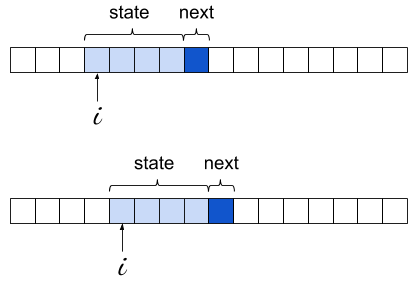
The learning loop is extremely concise; this is made possible by the right choice of Python data structures. First, we use a defaultdict for the model itself; this lets us avoid existence checks or try for states that don't appear in the model at all.
Second, the objects contained inside model are of type Counter, which is a subclass of dict with some special sauce. In its most basic usage, a counter is meant to store an integer count for its keys - exactly what we need here. So a lot of power is packed into this simple statement:
model[state][next] += 1
If you try to rewrite it with model being a dict of dicts, it will become much more complicated to keep track of the corner cases.
With the learning loop completed, we have in model every 4-letter string encountered in the text, mapped to its Counter of occurrences for the character immediately following it. We're ready to generate text, or "sample from the model".
We start by picking a random state that was seen in the training text. Then, we loop for an arbitrary bound and at every step we randomly select the following character, and update the current state. The following character is selected using weighted random selection - precisely the right idiom here, as we already have in each counter the "weights" - the more often some char was observed after a given state, the higher the chance to select it for sampling will be.
Starting with Python 3.6, the standard library has random.choices to implement weighted random selection. Before Python 3.6 we'd have to write that function on our own (Counter has the most_common() method that would make it easier to write an efficient version).
May 04, 2024
Python People
Rob Ludwick - Getting the most out of PyCon, including juggling
PyCon US is just around the corner. I've asked Rob Ludwick to come on the show to discuss how to get the most out of your PyCon experience. There's a lot to do. A lot of activities to juggle, including actual juggling, which is where we start the conversation.
Even if you never get a chance to go to PyCon, I hope this interview helps you get a feel for the welcoming aspect of the Python community.
We talk about:
- Juggling at PyCon
- How to get the most out of PyCon
- Watching talks
- Hallway track
- Open spaces
- Lightening talks
- Expo hall / vendor space
- Poster sessions
- Job fair
- A welcoming community
- Tutorials
- Sprints
- But mostly about the people of Python and PyCon.
"Python enables smart people to work faster" - Rob Ludwick
The Complete pytest Course
- Level up your testing skills and save time during coding and maintenance.
- Check out courses.pythontest.com